TL;DR: A stuck Facebook ad account spending limit usually means one of three things hit: the account’s lifetime spending cap, Meta’s own daily limit, or a campaign-level cap. The account spending limit never resets automatically, you must reset, raise, or remove it manually in Payment Settings.
If ads paused but the account looks fine, check whether it’s actually a payment failure instead, since that looks similar but needs a different fix.
What Does It Mean When a Facebook Ad Account Spending Limit Is Stuck?

A stuck spending limit means your ad account has hit a spend ceiling and Meta paused delivery until you act.
This is different from a disabled account or a rejected ad, the account itself is healthy, it’s just capped.
The tricky part is that there are three separate types of limits, and each one needs a different fix.
Confusing them is the number one reason advertisers waste hours resetting the wrong setting.
If you want the full mechanics of how these caps are calculated, this breakdown of how the spending limit works is a useful companion to this troubleshooting guide.
The Three Types of Spending Limits (Most Guides Blur These Together)

There are three distinct spending limits on Facebook ads, and mixing them up is why most troubleshooting advice fails.
Knowing which one you’re dealing with is the entire diagnosis.
1. Account Spending Limit (ASL)
The Account Spending Limit is a lifetime cap you (or a previous admin) set manually in Payment Settings.
Once total lifetime spend on the account reaches that number, every campaign and ad set pauses at once, not just one campaign.
This is the limit most people mean when they say their spending limit is stuck.
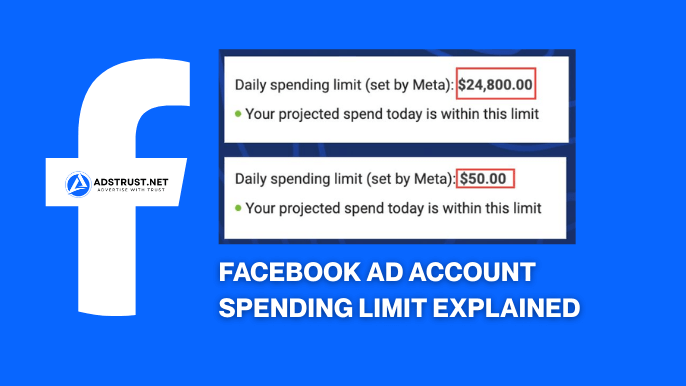
2. Meta-Set Daily Spending Limit
This is a limit Meta itself applies to newer or lower-trust accounts, separate from anything you configured.
It resets daily rather than being a lifetime cap, and it’s tied to account trust signals rather than a number you typed in.
New accounts, accounts with a thin payment history, or accounts flagged for review often see this limit even if the owner never set one.
3. Campaign-Level Spending Cap
This is a budget or spending limit applied inside a specific campaign, not the whole account.
If only one campaign has paused while others keep spending, this is almost always the culprit, not the account-wide limit.
| Limit Type | Scope | Resets? | What Pauses |
| Account Spending Limit (ASL) | Entire ad account | No, lifetime cap until manually changed | All campaigns and ads |
| Meta-Set Daily Limit | Entire ad account | Yes, daily | All campaigns and ads |
| Campaign Spending Cap | Single campaign | Depends on setting | Only that campaign |
Quick Diagnostic: Does One Campaign Pause or All Ads?

The fastest way to identify which limit hit is to check delivery scope across your account.
If every single campaign paused simultaneously, you’re dealing with either the Account Spending Limit or a Meta-set daily limit, not a campaign cap.
If only one campaign stopped while others keep spending normally, the campaign-level cap is almost certainly the cause.
- All ads paused at once, same moment → check Account Spending Limit first
- All ads paused but you never set a manual limit → likely a Meta-set daily limit tied to trust signals
- Only one campaign paused → check that campaign’s own budget/spend cap settings
- Ads paused with a payment error message → this is a billing issue, not a spending limit at all
Why Do Spending Limits Exist and When Do They Trigger?
Spending limits exist to give advertisers and Meta a hard financial stop so an account can’t overspend unexpectedly.
The limit activates the moment total spend reaches the cap you (or Meta) set, at which point delivery pauses across affected campaigns instantly.
There’s no grace period or warning threshold before the pause, spend either sits under the cap or it doesn’t.
This is a deliberate control mechanism per Meta’s advertising standards, which frame spend controls and billing integrity as core account requirements, not optional settings.
Step-by-Step: How to Fix a Stuck Account Spending Limit

You have three real options once the Account Spending Limit is confirmed as the blocker: reset it, increase it, or remove it entirely.
Each does something different, so pick based on what you actually need going forward.
Reset the Amount Spent
Resetting effectively restarts the counter against the same cap, useful if you want to keep the same ceiling but clear what’s already counted against it.
This does not raise how much you can spend overall, it just lets the same number accumulate again from zero.
Increase the Limit
Increasing the limit raises the ceiling itself, letting the account spend further before pausing again.
This is the move most advertisers actually want when scaling, not a reset.
Remove the Limit Entirely
Removing the limit takes the cap off altogether, so spend is only constrained by campaign budgets and your payment method’s own limits.
This is common on accounts that have built enough trust and billing history that a manual ceiling no longer makes sense.
- Confirm you have Admin or Finance Editor access to the ad account, limit changes require one of these roles
- Open Payment Settings and locate the Account Spending Limit section
- Choose reset, increase, or remove based on your goal
- Confirm the payment method attached is valid and not flagged
- Save the change and wait, propagation is not instant
How Long Does a Spending Limit Change Take to Apply?
Changes to the Account Spending Limit typically take about 15 minutes to propagate before ads can resume delivery.
If ads are still paused well beyond that window, the block is likely something else, a payment failure, a Meta-set daily limit, or an account-level restriction rather than the ASL you just edited.
Refreshing the dashboard, checking the ad account’s Billing tab, and confirming the payment method status are the next steps if the wait doesn’t resolve it.
Does the Facebook Spending Limit Reset Automatically Every Month?
No, the Account Spending Limit is a lifetime cap, not a monthly allowance, so it never resets on its own.
Advertisers who assume it works like a monthly ad budget are usually the ones stuck longest, waiting for a reset that will never come.
Only a manual reset, increase, or removal changes it, and only the Meta-set daily limit (a separate mechanism) refreshes on a daily cycle.
Spending Limit Stuck vs. Payment Failure: How to Tell the Difference
A stuck spending limit and a failed payment look almost identical on the surface, paused ads, no obvious error, but the causes and fixes are completely different.
A spending limit issue is about a cap you or Meta set, while a payment failure is about the payment method itself not going through.
- Declined card: expired, insufficient funds, or bank-blocked transaction
- Unpaid balance: a previous charge failed and now blocks new spend until settled
- Payment threshold mismatch: Meta’s internal charge trigger point isn’t aligned with actual spend, a separate concept from the account spending limit
- Payment method flagged: repeated failures or inconsistent billing details can trigger manual review
If Payment Settings shows a red warning or “payment failed” message, that’s billing, not a spending limit, and no amount of resetting the ASL will fix it.
Understanding Payment Threshold vs. Account Spending Limit
The payment threshold is the spend amount that triggers Meta to actually charge your payment method, it is not the same thing as the Account Spending Limit.
An account can have its spending limit raised or removed while the payment threshold stays low, which means ads may still pause for billing reasons even after the ASL is fixed.
This is one of the most overlooked scenarios: advertisers raise the limit, assume the problem is solved, then get confused when spend stalls again a few dollars later because the threshold itself hasn’t grown alongside it.
Threshold increases tend to follow consistent, on-time payment history over time rather than a single manual request.
Why Payment Trust Signals Affect Your Ability to Raise Limits
Clean payment history is one of the strongest levers for getting spending limits and thresholds raised without friction.
A consistent card, on-time charges, and no manual payment requests all signal to Meta that the account is low-risk, per Meta’s Business Help Center guidance on payment settings and account standing.
Accounts that repeatedly switch cards, rely on manual bank transfers, or have failed charges tend to see slower limit increases and more frequent manual review flags.
This is closely tied to broader account quality signals; for more on what patterns Meta treats as risk indicators, see this guide to account quality.
Prepaid vs. Postpaid Accounts: Does It Change the Limit Behavior?
On prepaid accounts, you fund the balance upfront and spend against it, so the Account Spending Limit interacts less with billing failures since there’s no card to decline mid-campaign.
On postpaid accounts, Meta charges the card after spend accumulates to the payment threshold, which is where billing failures and threshold mismatches show up more often.
New accounts and accounts in certain regions or industries are more likely to start on manual or prepaid-style billing until enough trust is built.
Diagnosis Checklist Before You Touch Any Settings
- Confirm you have Admin or Finance Editor access, without it you cannot see or edit the spending limit
- Check whether one campaign paused or the entire account paused
- Open Payment Settings and check for any payment failure or declined card warning
- Check the Account Spending Limit field for a manually set number
- Check if the account is new or has a thin billing history, a sign of a Meta-set daily limit
- Confirm the payment threshold hasn’t lagged behind a recently raised spending limit
When to Just Reset vs. When to Request a Meta Review
If the diagnosis clearly points to your own manually set Account Spending Limit, resetting or raising it yourself is the fastest fix and usually resolves within minutes.
If the account shows a Meta-set daily limit tied to trust signals, or a payment threshold that won’t move despite clean billing history, that’s when escalating through Meta’s support channels for a manual review makes more sense than repeatedly editing settings that won’t change the underlying trust signal.
Persistent, unexplained limits on an otherwise healthy account are also a sign worth reading up on separately, since this piece on ad accounts staying limited too long covers the deeper causes behind accounts that never seem to graduate past low caps.
Why New or Untrusted Ad Accounts Get Stuck on Low Limits More Often
Newer ad accounts, accounts with little ad spend history, and accounts without an established Business Manager behind them tend to see lower Meta-set limits and slower threshold growth.
This is why agencies and media buyers scaling multiple campaigns often prefer starting from an ad account with an existing spend history and clean billing record rather than a fresh signup with no track record.
If rebuilding trust from zero each time is slowing your scaling, working from verified ad accounts that already carry stable spend history and payment trust signals removes a lot of this guesswork from day one.
If chasing spending limit resets and payment threshold quirks is eating your week, the faster path is starting from a clean, verified ad account instead of fighting an unstable one. AdsTrust prepares Facebook ad accounts and Business Managers with tested, working payment setups before delivery, so you’re not troubleshooting from zero.
FAQ: Facebook Ad Account Spending Limit Stuck
What is the difference between account spending limit and daily spending limit on Facebook?
The Account Spending Limit is a lifetime cap you set manually that never resets on its own, while Meta’s daily spending limit is applied automatically to lower-trust accounts and resets each day.
Why is my Facebook ad spending limit not increasing even though I’ve been spending?
Spend volume alone doesn’t raise limits, payment trust signals like consistent on-time billing and a stable payment method matter more, and the payment threshold may be lagging separately from the spending limit.
How long does it take for a Facebook spending limit increase to take effect?
Changes typically take about 15 minutes to propagate; if ads are still paused after that, check for a separate payment failure or Meta-set daily limit.
Can I reset my Facebook ad spending limit to start over?
Yes, resetting clears the amount counted against your existing cap, but it does not raise the ceiling itself, that requires a separate increase or removal.
Does my Facebook ad spending limit reset every month?
No, the Account Spending Limit is a lifetime cap and does not reset monthly, only manual action changes it.
What causes a Facebook ad payment to fail?
Common causes include a declined or expired card, insufficient funds, an unpaid previous balance, or a payment method flagged during manual review.
Why is my spending limit stuck even after I increased it?
The payment threshold, Meta’s internal charge trigger, may not have grown alongside the spending limit, which can still pause delivery even after the limit itself is raised.
How do I know if my ads stopped because of spending limit vs. payment failure?
Check Payment Settings for a declined card or payment failure warning; if none appears and the Account Spending Limit field shows a set number matching total spend, it’s the limit, not billing.
Can Meta set a spending limit without me doing it?
Yes, Meta applies its own daily spending limit to newer or lower-trust accounts independent of any manual limit you configure.
What’s the difference between removing and resetting a spending limit?
Resetting clears the counted spend against the same cap, while removing eliminates the manual cap entirely so only campaign budgets and payment capacity constrain spend.
Written by Victor Kwang, Meta advertising specialist and blog lead at AdsTrust Global Pte. Ltd., Singapore. Victor has worked in Meta advertising since 2017 and writes practical, no-nonsense guides for agencies and media buyers scaling Facebook ad accounts. Read more from Victor on the AdsTrust author page.