
TL;DR: A brand-new Facebook Business Manager typically starts with a small ad account creation limit, often just a handful, depending on trust signals Meta assigns at setup. That ceiling tends to rise over time through spending history, business verification, and clean policy compliance, with established, high-spend BMs eventually able to hold considerably more.
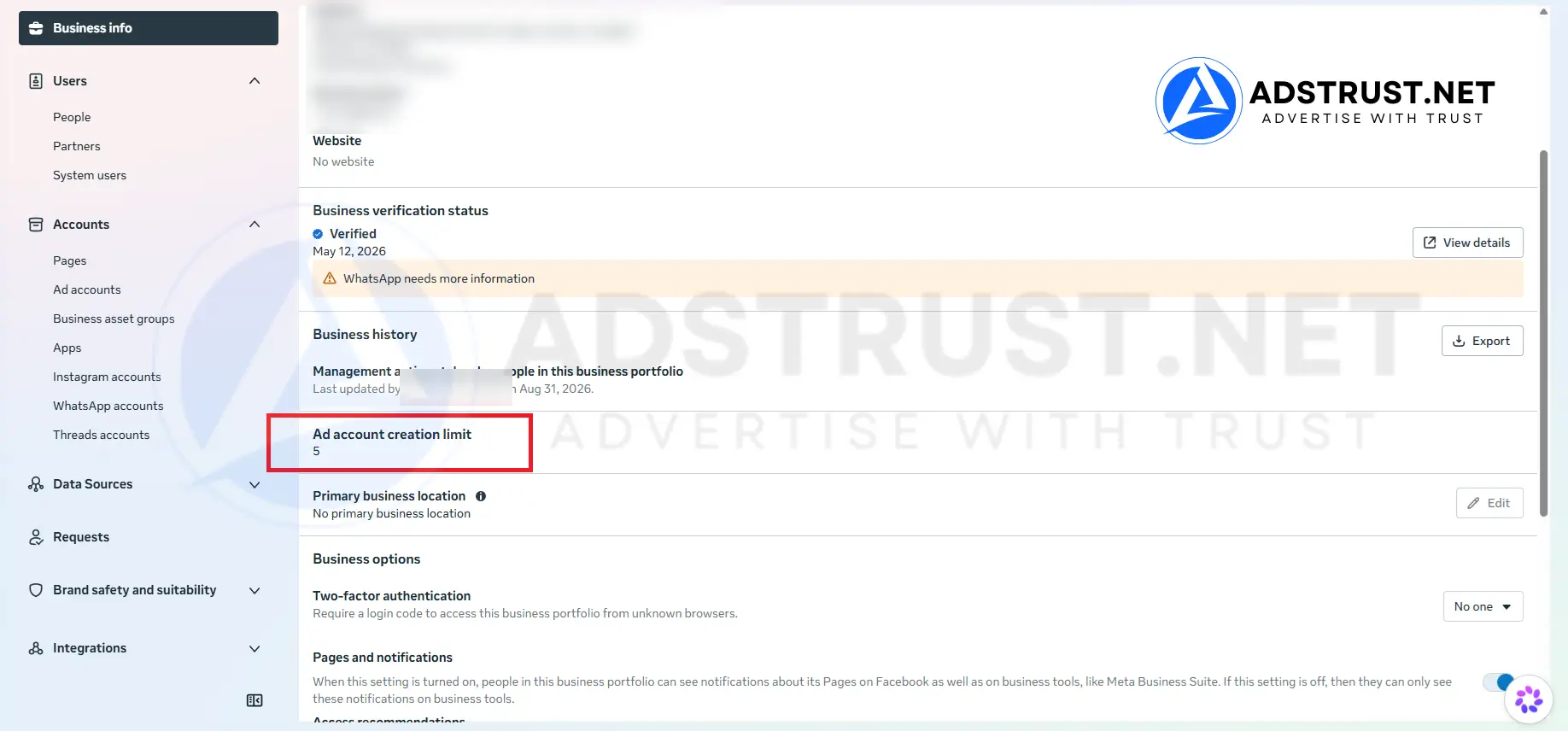
Check your current cap under Business Settings > Business Info. Pre-verified BMs can start closer to the capacity you need.
What Is the Default Ad Account Limit for a New Business Manager?
A new Business Manager usually starts with a low ad account creation limit, commonly reported as just a few accounts depending on the specific BM and how it was set up.
This inconsistency isn’t a bug, it’s Meta assigning trust conservatively to unproven entities.
A fresh BM with no ad spend, no verified business, and no history can look similar to a fraud attempt to Meta’s automated systems.
So the platform tends to start everyone small, then expand the limit as trust signals accumulate.
If you want the deeper mechanics of how a BM structures and governs its accounts, our complete Business Manager guide covers types, limits, and safe usage in one place.
How the Trust Ladder Actually Works
Meta’s ad account limit system functions like a trust ladder, where each rung requires evidence you can be trusted with more capacity before you’re allowed to climb further.
In broad terms, the progression tends to move from a new BM with a small handful of accounts, toward a mid tier with noticeably more room, then a higher tier for established, verified BMs, and eventually much larger capacity for long-standing enterprise setups.
None of these thresholds are published as fixed numbers by Meta, and in our team’s experience the exact figures can vary by account history, region, and vertical, so treat any specific numbers you see elsewhere as rough anecdotes rather than official tiers.
But the general direction is consistent: more verified spend, more verified identity, more time in good standing tends to correspond with a higher ceiling.
| Stage | General Pattern | What Tends to Unlock It |
| New / unverified BM | Small handful of accounts | Account creation, first ad spend |
| Established BM | Noticeably more room | Weeks to months of clean spend history |
| Verified, higher-spend BM | Meaningfully higher tier | Business verification alongside consistent payment behavior |
| Long-standing enterprise BM | Largest capacity observed | Long-term compliance, sustained verified spend |
This is directional, not a guarantee, since Meta adjusts limits algorithmically and doesn’t disclose exact formulas or thresholds.
How Do I Check My Current Ad Account Limit?
You can typically see your ad account creation limit inside Business Settings under the Business Info section of your Business Manager.
Meta surfaces the current cap there, along with how many accounts you’ve already created against it.
If the number shown feels low for a BM that’s been active a while, that’s usually a sign trust signals like verification or spend consistency haven’t been established yet, not necessarily a permanent ceiling.
Creation Limit vs Access Limit
A creation limit caps how many ad accounts you can build and own inside your Business Manager, while an access limit works differently for accounts you’re granted permission to manage on behalf of a client.
This is the detail agencies rely on legitimately: if a client owns their ad account and grants your BM Admin or Advertiser access, that account generally doesn’t count against your own creation quota.
- Owned accounts: count toward your BM’s creation limit
- Client-owned accounts you’re granted access to: generally don’t count the same way
- Agencies scaling across many clients often rely on access, not raw creation volume
This is why agencies managing many client ad accounts don’t necessarily need a BM with a very high creation ceiling, they need clean access permissions and a BM in good standing to hold them.
For a deeper breakdown of how BM structures interact with the accounts underneath them, see how Business Manager controls ad accounts.
Why Does Meta Limit Ad Accounts Per Business Manager?
Meta limits ad account creation primarily to slow down abuse patterns, since bad actors historically spun up mass accounts to run scams, ban-evade, or launder policy violations across throwaway assets.
Per Meta’s advertising standards, advertisers are expected to maintain compliant, transparent business practices, and account limits are one lever Meta uses to enforce that at scale.
A trust-based ceiling makes it harder for someone to create many accounts at once and burn through them before detection.
Legitimate advertisers absorb some inconvenience as a side effect, but the mechanism itself is aimed at fraud and policy-abuse prevention, not at punishing normal growth.
Ways to Increase Your Ad Account Limit
There are a few levers that can influence how your ad account limit grows over time: consistent spending history, completing business verification, and in some cases requesting a manual review from Meta support.
- Build spending history: consistent, policy-compliant ad spend over weeks and months tends to signal reliability more than any single large payment
- Complete business verification: submitting legal business documents through Meta’s verification process is, in our team’s experience, often a meaningful accelerant alongside spend history
- Request a limit increase: some BMs can request a review directly, though approval isn’t guaranteed and depends on the account’s overall standing
In our team’s experience, business verification combined with steady spend tends to produce better results than heavy spend alone, since verification adds a layer of accountability to the business entity in Meta’s eyes.
Results vary by account and vertical, so treat this as a general pattern rather than a formula.
Realistic Timelines: What to Expect
There’s no fixed published timeline for tier progression, but in practical terms, teams in our experience generally report needing a few months of clean, consistent spend before seeing a meaningful jump in limit.
Verification, when approved, can sometimes shorten that window, occasionally unlocking a higher tier sooner.
Treat these as directional patterns, not contractual promises, since Meta’s internal review logic isn’t disclosed and can shift.
What Counts Against Your Limit, and What Doesn’t
Only ad accounts you create and own under your Business Manager count toward your creation limit, while accounts you access through client permissions generally sit outside that count.
A commonly asked follow-up is whether disabled or suspended accounts still occupy a slot, and in most cases, yes, a disabled account you created still counts against your historical usage even though it’s no longer functional.
Deleting or deactivating an account does not reliably free up a new creation slot either, based on patterns our team has observed, so removing dead weight isn’t a guaranteed workaround.
This is one reason policy violations are so costly beyond the immediate account loss, since a string of disabled accounts can drag down your BM’s overall standing and slow further limit growth.
For the mechanics of how disabled status spreads and what it does to a BM’s health, read why Business Manager gets disabled.
Personal Profile Cap vs Business Manager Flexibility
A personal Facebook profile is generally capped at owning a single active ad account tied to it outside of a Business Manager, and that ceiling doesn’t move regardless of spend or age.
A Business Manager, by contrast, is the container designed specifically to scale beyond that single-account ceiling, which is exactly why agencies and serious advertisers operate through BMs rather than personal ad accounts.
If you’re still running ads from a personal profile, migrating into a proper BM structure is close to mandatory once you need more than one active campaign account.
Can You Use Multiple Business Managers to Bypass the Limit?
Creating multiple Business Managers to work around a single BM’s ad account cap is technically possible, but it doesn’t reset trust, since Meta ties account history to the underlying personal profile and business entity, not just the BM container.
Spreading accounts across several fresh BMs under the same personal profile can resemble the abuse pattern Meta’s limit system was built to catch, and it risks review or restriction across all of them rather than granting a clean slate.
A more sustainable approach is deciding deliberately how many BMs your operation actually needs, structured for genuine business reasons like separate clients or brands.
Our guide on how BM works walks through when running multiple BMs makes sense versus when it just adds risk.
Agency Strategy: Access Requests vs Building Owned Accounts
For agencies, the fastest path to managing many ad accounts is usually requesting access to client-owned accounts rather than trying to raise your own BM’s creation ceiling.
This keeps your BM lean while still letting you operate across multiple clients, since access permissions don’t consume your creation quota the same way ownership does.
That said, agencies still need at least one well-standing BM as the operational base, and a BM with a troubled compliance history can create risk for the client relationships built on top of it.
For a deeper look at how agencies architect this, see how BM warm-up and the comparison of shared Business Manager vs owned BM setups.
The Faster Path: Starting with a Higher-Tier BM
Waiting months for a new BM to climb the trust ladder isn’t always realistic when a client campaign needs to launch this week, which is where a pre-verified, higher-capacity BM changes the calculation.
AdsTrust prepares Business Manager tiers ranging from small setups suited to solo advertisers up through larger BMs built for agencies running concurrent ad accounts, all inspected and delivered in working condition, with warranty coverage as stated on AdsTrust’s warranty terms.
Rather than starting a brand-new BM at the bottom rung and spending weeks proving compliant spend, teams can start from a tier that already reflects more of the account volume they need.
Browse the available Business Manager options to find a tier suited to your current ad account volume.
If you’re tired of waiting on Meta’s trust ladder to catch up with your growth plans, AdsTrust offers verified Business Managers across multiple tiers, inspected before delivery, so you can start with more working capacity instead of a fresh, low starting cap.
Delivery is typically instant to 24 hours, with some products needing extra verification taking up to 48 hours, and payment is accepted in USDT, BTC, or ETH.
FAQ
How do I check my ad account creation limit in Facebook Business Manager?
Open Business Settings and navigate to Business Info, where Meta typically displays your current ad account creation limit alongside how many you’ve already used.
Can I create more than a handful of ad accounts in one Business Manager?
Yes, many BMs progress well beyond their starting limit as spending history, business verification, and clean compliance accumulate over time, with established BMs reaching noticeably higher caps.
How long does it take for Meta to increase my ad account limit?
There’s no fixed published timeline, but in our team’s experience, a few months of consistent, policy-compliant spend often precedes a visible limit increase, and business verification can sometimes shorten that window.
What’s the difference between creating an ad account and requesting access to one?
Creating an ad account means you own it and it counts against your BM’s creation limit, while requesting access to a client-owned account generally lets you manage it without consuming that same quota.
Why does Meta limit ad accounts per Business Manager?
Meta limits creation primarily to prevent fraud and mass-abuse patterns, aligning with the compliant advertising practices outlined in Meta’s advertising standards, and tends to expand limits gradually as trust signals build.
Can I use multiple Business Managers to bypass the ad account limit?
Not reliably, since Meta ties trust history to the underlying personal profile and business entity, and spreading accounts across fresh BMs can resemble the abuse pattern the limit system was designed to catch.
Do suspended or disabled accounts count toward my limit?
In most cases, yes, a disabled account you created still counts against your historical usage, and deleting it does not reliably free up a new creation slot.
Written by Victor Kwang, Meta advertising specialist and blog lead at AdsTrust Global Pte. Ltd. (Singapore), where the team has worked in Meta advertising since 2017. See more from Victor on the AdsTrust author page.