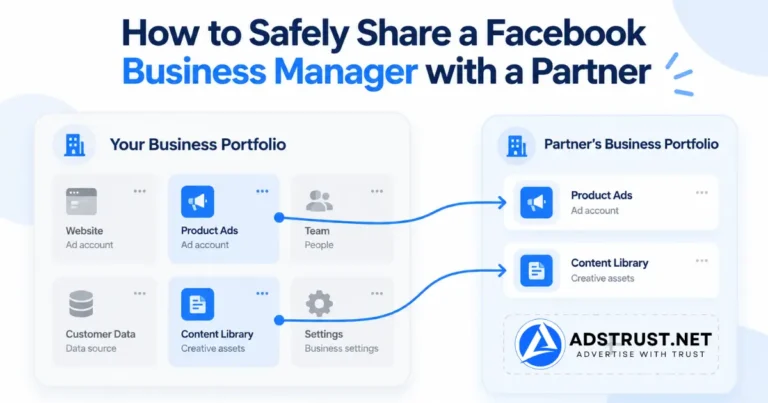

TL;DR: Share a Business Manager through Partners, never by handing over a login. In Business Settings, open Users, then Partners, click Add, choose to give a partner access to your assets, and enter their business portfolio ID.
Grant partial access rather than full control unless there is a specific reason, and review the partner list on a schedule rather than when something goes wrong.
Most access problems inside a Business Manager are not hacks. They are permissions that were granted quickly and never removed.
A freelancer finishes a project, a contractor moves on, an agency relationship ends, and the access stays exactly where it was.
Partner Access, Not a Shared Login
The first decision matters more than any setting that follows.
Sharing a password puts another person inside your personal profile, with everything attached to it. You cannot see what they did, you cannot limit them to one asset, and revoking it means changing your own credentials.
Partner access connects their Business Manager to specific assets in yours. Actions are attributable, scope is limited, and removal is one click that affects nothing else.
There is also a quieter reason. Logins shared across people and locations are exactly the kind of pattern that draws automated attention, which is part of why Business Managers get disabled.
How to Add a Partner
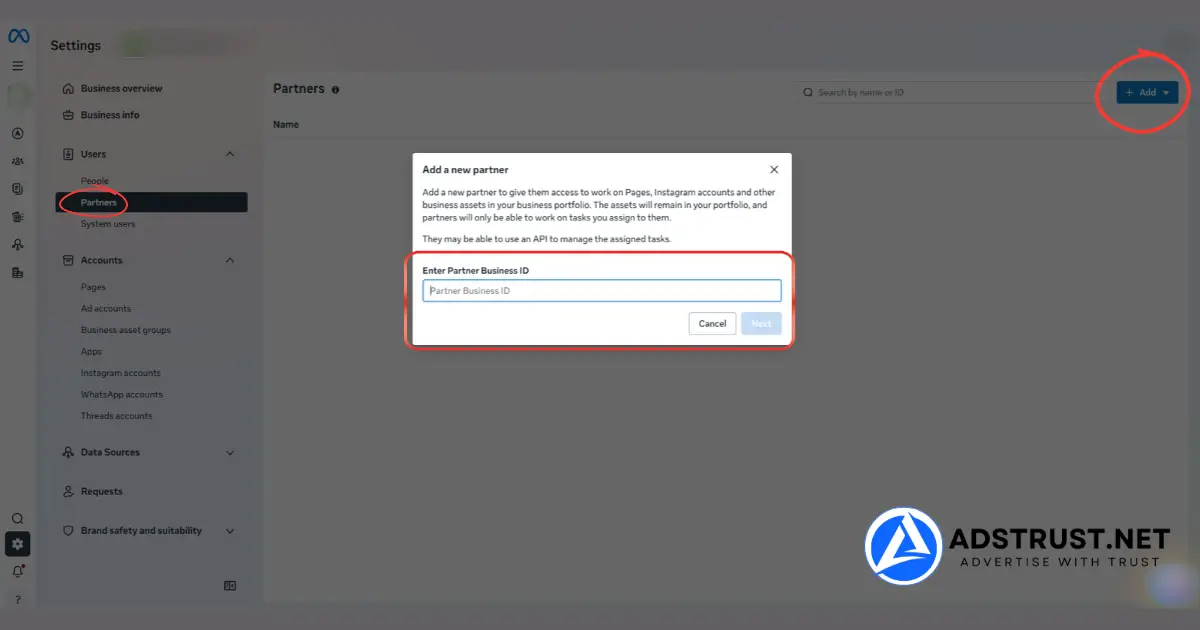
You need full control of the Business Manager to do this, and your partner needs their own business portfolio plus its ID.
- Open Settings for your business portfolio.
- In the left menu under Users, click Partners.
- Click Add, then choose Give a partner access to your assets.
- Enter your partner’s business portfolio ID. They have to send it to you, you cannot look it up.
- Select the assets to share, and set the permission level on each.
Note the direction. This is you giving access, not them taking it. The alternative option asks a partner for access to their assets instead, which is a different flow.
Full Control or Partial Access
This choice is where most people are too generous, usually to avoid a follow-up message.
| Partial access | Full control | |
|---|---|---|
| What it allows | Specific tasks: create content, manage ads, reply to messages | Manage everything on that asset |
| Can re-share the asset | No | No, only the owner can share it onward |
| Right for | Media buyers, freelancers, most agency work | A partner genuinely running the asset for you |
One reassuring detail: even with full control, a partner cannot pass your asset on to a third business. Only the owning portfolio can do that.
That removes the worst-case scenario, but it does not make full control the sensible default. Partial access covers almost all real agency work.
Share Assets, Not the Portfolio
Partner access is granted per asset. Use that.
A media buyer running one campaign needs that ad account and the Page attached to it. They do not need your pixel library, your catalogs, or the other nine ad accounts.
Sharing broadly because it is faster is how a Business Manager ends up with a dozen partners holding access to everything.
If you share with the same partners repeatedly, group the assets first. Our guide on using Business Asset Groups covers how to bundle a Page, pixel and ad account so access is granted once instead of three times.
The Three Lists People Forget to Check
Removing someone from one list does not remove them from the others.
- People. Individuals added directly to your portfolio. The list everyone checks.
- Partners. Other businesses holding access to your assets. Checked occasionally.
- System users. API connections with their own permissions. Almost never checked, and they keep working after every person is gone.
The third one is the gap. If a previous agency set up an integration, that connection survives the relationship ending unless someone goes looking for it.
Check all three when a partnership ends, and again when you take over a Business Manager from anyone.
Removing Access Cleanly
- Remove the partner in Settings, under Users, then Partners.
- Check the People list for individuals from that company added separately.
- Check System users for integrations set up during the engagement.
- Review asset by asset. Open the main ad accounts and Pages and confirm nothing unexpected remains.
- Do it on the agreed end date, not weeks later when you remember.
Doing this on a schedule rather than reactively is the difference between a tidy portfolio and one carrying three years of accumulated access.
When Sharing Is the Wrong Answer
Sometimes the request is not really about access.
If a partner needs their own spending ceiling, their own payment method, and full independence over structure, they need their own Business Manager rather than a slice of yours.
Trying to run two independent operations inside one portfolio creates permission churn, and that churn is itself a risk signal.
The trade-offs are covered in shared Business Manager vs owned BM. If a second portfolio is the right answer, the Business Manager range covers the tiers.
FAQ: Sharing a Facebook Business Manager with a Partner
How do I share a Business Manager with a partner?
In Settings, under Users, click Partners, then Add, then Give a partner access to your assets, and enter their business portfolio ID.
You then choose which assets to share and what permission level to give on each.
Do I need their business portfolio ID?
Yes, and they have to send it to you. There is no way to look it up from your side.
A partner who cannot produce one does not have a business portfolio set up yet.
Should I give full control or partial access?
Partial access for almost all work. It covers creating content, managing ads and replying to messages, which is what most partners actually do.
Reserve full control for a partner genuinely running the asset on your behalf.
Can a partner share my asset with someone else?
No. Even with full control, only the portfolio that owns an asset can share it onward.
That limits the damage, but it is not a reason to grant more than needed.
Is sharing a login ever acceptable?
We would say no. You lose attribution, you cannot limit scope, and revoking means changing your own password.
Logins used across multiple people and locations also produce exactly the access pattern that triggers automated review.
What are system users and do I need to check them?
They are API connections with their own permissions, separate from People and Partners.
Yes, check them. Removing every person and partner leaves system users untouched, so old integrations keep working indefinitely.
How often should I review access?
Quarterly is enough for most teams, plus immediately whenever a partnership ends.
Also review it the day you take over any Business Manager from someone else, before you start using it.
Does adding partners risk a restriction?
Adding a partner normally is routine. What draws attention is volume and speed, such as several permission changes in one session on a young portfolio.
Space the changes out and the risk drops considerably.
Share narrowly, review on a schedule, and check all three access lists rather than only the obvious one. That covers almost everything that goes wrong here.
Written by Victor Kwang, Meta advertising specialist and blog lead at AdsTrust Global Pte. Ltd., Singapore. See more from Victor on the author page.