

BM50 is a Facebook Business Manager that holds up to 50 ad accounts, each running at either a $250 daily limit or a No Limit configuration.
It is the first genuinely agency-grade tier. You buy it when you need a separate account per client, per market or per offer, and ten accounts have stopped being enough.
At the scaling phase, most failures no longer come from creatives. They come from a Business Manager that cannot absorb growth.
When everything sits in one place, one restriction stops everything at once. BM50 exists to spread that risk across fifty separate places.
What Is BM50 Facebook Business Manager?

BM50 is a Facebook Business Manager that lets you manage up to fifty ad accounts under one organized portfolio, with one set of permissions and one place to audit.
It is built for advertisers who already operate at scale and need flexibility in how campaigns are organized, how assets are isolated, and how risk is distributed.
The fifty accounts are not the product. The separation they allow is.
Ad Account Capacity and Spending Limits

Where to check it yourself: Business Settings, Business info, Ad account creation limit. Business details are redacted in the screenshot above.
Each ad account comes with a $250 daily spending limit, or no limit, depending on configuration.
Note that BM50 ships unverified. Business verification is a separate process you complete yourself, or you start from a BM Verified Facebook Business Manager if verified standing matters on day one.
With fifty accounts, total spend grows by bringing more accounts online rather than by pushing one account’s daily budget up sharply. That sharp jump is the pattern Meta is most likely to flag.
Why Advertisers Buy BM50
Advertisers move to BM50 when they need:
- many ad accounts running in parallel rather than in sequence,
- clear separation between campaigns, clients or funnels,
- reduced blast radius when one ad account is flagged,
- fewer full rebuilds of their advertising system over time.
Where BM10 supports structured scaling for one operator, BM50 is built for parallel execution across a team.
The practical difference is client isolation. An agency can give every client their own account, so a restriction on one client never touches another client’s campaigns or audiences.
How to Structure 50 Ad Accounts of BM50
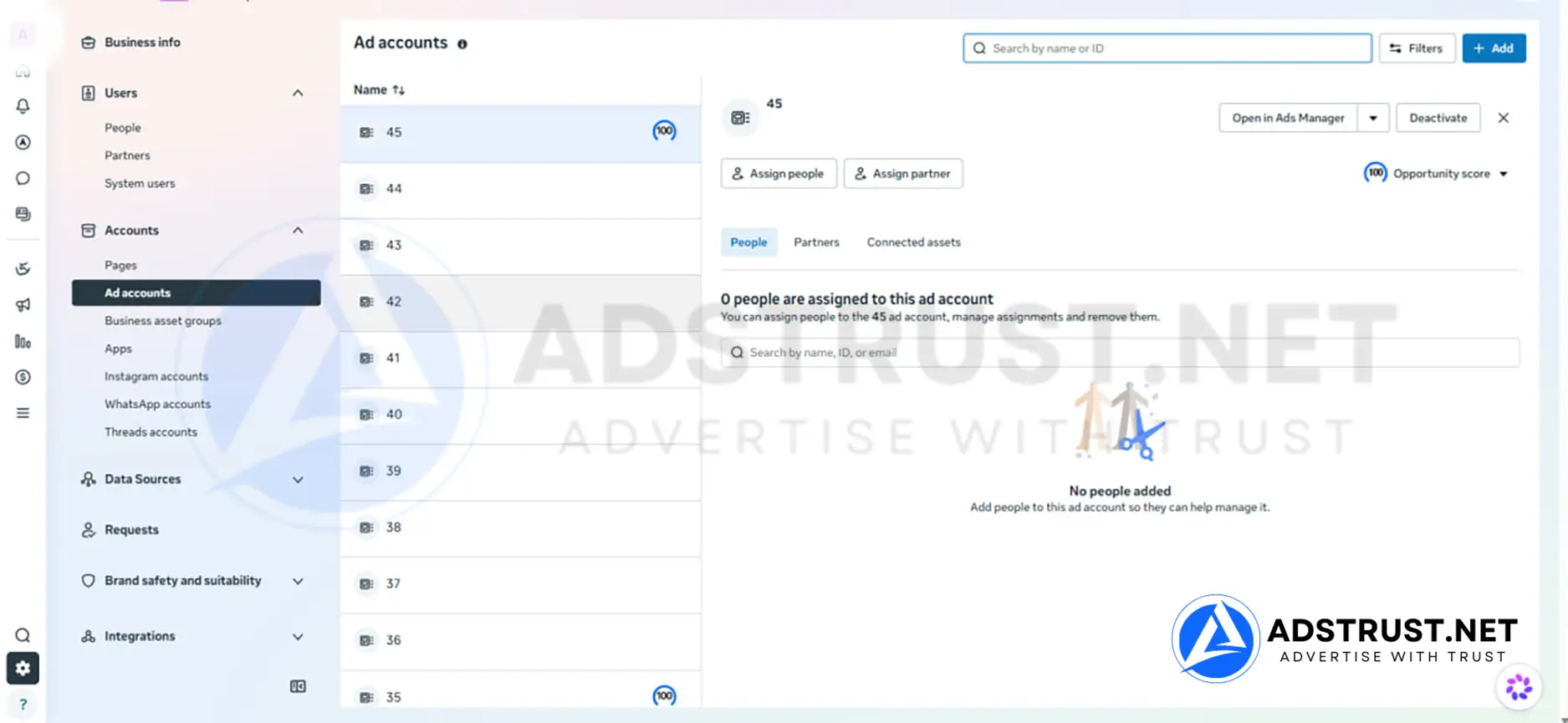
Experienced advertisers do not activate all fifty accounts at once. Fifty cold accounts are not an asset, they are fifty things you cannot use yet.
A structure that holds up looks roughly like this:
- Open only what you need now. One account per active client, market or offer, warmed properly before it carries budget.
- Keep four or five warming in the background. Small, steady spend, so replacements are ready before you need them.
- Assign roles per team. Permissions are set per asset, so a media buyer only sees the accounts they run.
- Leave the rest closed. Capacity you have not opened costs nothing to hold and cannot be flagged.
The reserve accounts are what agencies value most. When a client account goes down mid-campaign, having a warmed account ready is the difference between an hour of downtime and a week.
Our Facebook ad account warm-up schedule sets out what a careful first few weeks look like on each account.
How BM50 Compares to BM10 and BM2500
BM50 is the first genuinely agency-grade tier. The jump from BM10 is about isolation, keeping each client or offer in its own account so one restriction cannot spread.
| Tier | Daily spending limit | Ad accounts | Best for |
|---|---|---|---|
| BM10 | $250 or No Limit | 10 | Cost-efficient scaling with real capacity |
| BM50 (this page) | $250 or No Limit | 50 | Agencies running many clients or offers |
| BM2500 | No Limit | up to 2,500 | Enterprise operations needing verified standing |
Two separate things scale here.
The number of ad accounts controls how much you can isolate, keeping a failing campaign away from a working one.
The daily spending limit controls how fast you can scale at all. BM10, BM50 and BM2500 all reach No Limit, so the difference between them is how many separate places you can put that spend.
Who Should Buy BM50, and Who Should Not
BM50 is designed for agencies managing multiple clients, affiliate teams running parallel funnels, brands scaling several offers at once, and advertisers who have clearly passed the testing stage.
It is not for beginners. If you are still validating offers or running small budgets, fifty accounts is capacity you cannot staff and cannot warm.
A useful test: count the accounts you would open in the first month and name who runs each one. If that number is under ten, BM10 is the honest answer.
Pushing a Business Manager harder than its history supports is one of the more common ways advertisers end up reading our guide to recovering a disabled Business Manager.
For a full map of which tier fits which stage, see our complete guide to Business Manager types, limits and safe usage.
What You Receive, Delivery, and Warranty
AdsTrust delivers BM50 as a digital advertising asset, configured exactly as described below.
| What you get | Details |
|---|---|
| Ad account capacity | Up to 50 accounts under one business portfolio |
| Daily spending limit | $250 per ad account, or a No Limit configuration |
| Business verification | Not included. The portfolio ships unverified |
| Works with | Ad accounts, Pages and Pixels under one portfolio |
| Delivery time | Instant to 24 hours. Up to 48 hours if extra verification is required |
| Delivered via | Telegram or email, to the contact details you provide |
| Warranty, standard setup | At the time of delivery: the Business Manager must be active, accessible and in working condition |
| Warranty, No Limit setup | The advertised spend limit is covered for 3 days after delivery |
| Refunds | Replacement within the warranty period. No refunds after delivery |
| Payment | USDT (TRC20 or ERC20), BTC or ETH. Full payment before delivery, no chargebacks |
| Support | Online 24/7, fastest via Telegram @adstrustnet |
Two things are worth being blunt about.
First, log in and inspect the portfolio as soon as it arrives. On the standard configuration the warranty covers the condition it is delivered in, so the check on arrival is the moment that matters.
Second, nobody can promise an account will never be restricted. Fifty accounts reduce how much a single restriction costs you. They do not prevent restrictions.
Full terms are on our warranty policy page.
Frequently Asked Questions
How many ad accounts does BM50 come with?
The portfolio carries an ad account creation limit of 50.
You can confirm it yourself before spending anything: open Business Settings, then Business info, and check the Ad account creation limit field.
Is BM50 verified?
No. BM50 ships unverified, and the Business verification status is visible in the same settings panel as the account limit.
If verified standing matters from day one, a BM Verified portfolio or BM2500 is the closer fit.
Should I open all fifty accounts straight away?
No. Cold accounts cannot carry budget, and opening everything at once creates work without creating capacity.
Open what you need now, keep four or five warming in the background as replacements, and leave the rest closed until there is a reason to use them.
Should I buy BM50 or BM10?
Both reach the same spending ceiling. The difference is how many separate places you can put that spend.
If you would open fewer than ten accounts in the first month, BM10 is the honest answer. BM50 makes sense when client or market isolation forces the account count up.
Should I buy BM50 or BM2500?
BM50 covers most agency workloads. BM2500 adds far more capacity and arrives with business verification already completed.
Move up when fifty accounts genuinely will not hold your client list, or when verified standing is a requirement rather than a preference.
Can several media buyers work in the same BM50?
Yes. Permissions are assigned per asset, so each buyer can be given access only to the accounts, Pages and Pixels they are responsible for.
This also limits what a compromised login can reach.
What happens if one ad account is restricted?
A restriction normally applies to that ad account rather than the whole portfolio. Other clients and campaigns keep running.
Repeated violations across many accounts can still put the portfolio at risk, so isolation reduces exposure without removing it.
BM50 makes sense when your constraint is structure rather than budget, and when you have the team to run accounts in parallel rather than one after another.
If that is not you yet, BM10 costs less and teaches the same lessons.
The price and order button are at the top of this page. If you are unsure whether BM50 or BM2500 fits your client list, message the team on Telegram before ordering.
Written by Victor Kwang, Meta advertising specialist and blog lead at AdsTrust Global Pte. Ltd. (Singapore). The AdsTrust team has worked in Meta advertising since 2017. Spending limits, review timings and account behavior described on this page reflect what we see in practice. Meta can change them at any time.




Reviews
There are no reviews yet.