

A BM Verified is a Facebook Business Manager that has already completed Meta’s business verification. It ships with no ad accounts.
What you are buying is standing, not capacity. The verification step that normally takes documents, a wait and a review is already done.
Not all Business Managers are treated the same way by Meta. A portfolio with verification behind it starts from a different position than one created last week.
Over a long campaign that difference compounds. Over a two-week test it barely matters, which is why this tier is the wrong buy for some people.
What Is a Verified Facebook Business Manager?

A Verified Business Manager is one that has successfully passed Meta’s business verification process.
That process checks four things about the business behind the portfolio:
- the legal business name,
- a business phone number,
- a website domain,
- a business address.
Once those clear, the portfolio is marked as a verified entity inside Meta’s system.
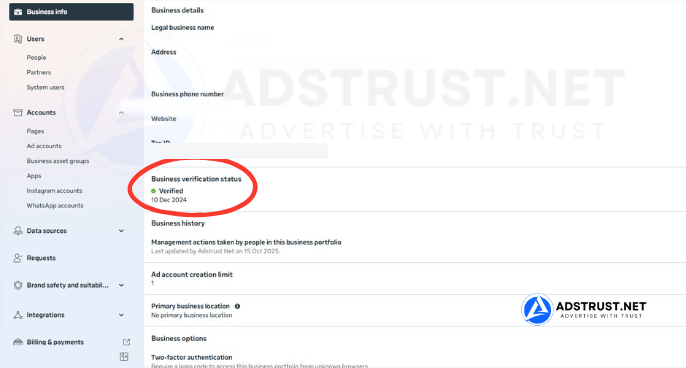
Where to check it yourself: Business Settings, Business info. The verification status and its date are shown in that panel. Business details are redacted in the screenshot above.
One point matters more than any other on this page. The Verified BM sold by AdsTrust includes only the verified Business Manager itself. It does not include advertising accounts. You create those yourself after delivery.
How a Verified BM Differs from a Regular Business Manager

Most new Business Managers begin with low trust and tight limitations. A Verified BM starts somewhere else, because the business entity behind it has already been checked.
In our team’s experience that shows up in how the portfolio handles ad account creation, payment activity and asset management. It is a better starting position, not a different rulebook.
Be clear about what it is not. Verification is not immunity. A verified portfolio running non-compliant ads gets restricted like any other.
Why Buy a Verified BM With No Ad Accounts?

At first glance the absence of ad accounts looks like something missing. For the buyers this tier is aimed at, it is the point.
Creating your own accounts means you control:
- how the account structure is laid out from day one,
- which payment method is attached and when,
- the spending pattern each account establishes,
- how fast each one is warmed.
An account someone else created has a history you did not write and cannot see. On a portfolio you intend to keep for years, that matters more than saving a step.
This is why a Verified BM is usually bought as a foundation rather than as a ready-to-run setup.
How a Verified BM Compares to Unverified Business Managers
A Verified BM is not a bigger tier. It sits on a different axis. What you are buying is completed verification, not accounts or spending headroom.
| Tier | Daily spending limit | Ad accounts | Best for |
|---|---|---|---|
| BM350 | $25 to $50 | 1 (up to 3) | Testing, plus holding a Pixel and Page long term |
| BM10 | $250 or No Limit | 10 | Cost-efficient scaling with real capacity |
| BM Verified (this page) | set by the accounts you create | none included | A verified, high-trust base to build assets on |
Two separate things scale in this range.
The number of ad accounts controls how much you can isolate, keeping a failing campaign away from a working one.
The daily spending limit controls how fast you can scale at all. A Verified BM has neither until you create accounts inside it, which is exactly why it is a foundation and not a shortcut.
When a Verified BM Is, and Is Not, the Right Choice
A Verified BM makes sense when you are building something you intend to keep. Long-term brand advertising, agency infrastructure, or a portfolio you will hand assets to for years.
It is the wrong purchase if you are testing small campaigns or running short experiments. You would be paying for standing you have no time to benefit from, then still having to create and warm accounts before spending anything.
In that situation BM350 or BM1 gets you running sooner and cheaper.
Advertisers who need capacity immediately rather than standing usually go to BM10. At enterprise scale, a BM2500 arrives verified and with capacity already in place.
For a full map of which tier fits which stage, see our complete guide to Business Manager types, limits and safe usage.
What You Receive, Delivery, and Warranty
AdsTrust delivers a Business Manager that has already passed Meta’s verification. There is no claim of guaranteed limits, instant scaling or special privileges beyond what verification legitimately provides.
| What you get | Details |
|---|---|
| Business verification | Already completed and visible in Business Settings on delivery |
| Ad accounts | None included. You create them yourself after delivery |
| Daily spending limit | Set by Meta on each account you create, not by the portfolio |
| Delivery time | Instant to 24 hours. Up to 48 hours if extra verification is required |
| Delivered via | Telegram or email, to the contact details you provide |
| Warranty | If verified status is revoked within 7 days of delivery, we issue a replacement |
| Refunds | Replacement within the warranty period. No refunds after delivery |
| Payment | USDT (TRC20 or ERC20), BTC or ETH. Full payment before delivery, no chargebacks |
| Support | Online 24/7, fastest via Telegram @adstrustnet |
Two things are worth being blunt about.
First, check the verification status the day it arrives. The warranty on this tier runs for 7 days from delivery, so the sooner you confirm it, the more of that window you keep.
Second, verification raises your starting position. It does not stop enforcement. How long the portfolio lasts still depends on how you use it and on Meta’s policies at the time.
Full terms are on our warranty policy page. Our honest answer on whether buying a Business Manager is safe and legal covers what actually gets accounts flagged.
Frequently Asked Questions
Does a Verified BM come with ad accounts?
No. This product is the verified Business Manager only.
You create ad accounts yourself after delivery, which is what gives you control over their structure, payment method and warm-up pace.
How do I confirm the BM is really verified?
Open Business Settings, then Business info. The Business verification status field shows whether the portfolio is verified and the date it was approved.
Do this on day one, because the warranty on verification runs for 7 days from delivery.
Does verification stop my account being restricted?
No, and nobody can honestly promise that. Verification is a trust signal about the business entity, not an exemption from Meta’s advertising rules.
A verified portfolio running non-compliant ads is restricted like any other.
Should I buy a Verified BM or a BM350?
BM350 arrives with an ad account and can spend on day one. A Verified BM cannot, until you create accounts inside it.
Choose BM350 to start testing quickly. Choose Verified when you are building a base you plan to keep for years and want the verification step behind you.
Can I add ad accounts I already own?
You can request access to accounts owned elsewhere through partner access, rather than moving them.
Adding an existing ad account directly to a new portfolio is more likely to draw a review than creating a fresh one inside it.
What spending limit will my ad accounts have?
Meta sets that per account, usually starting low on a newly created one and rising with payment history.
Verification of the business does not override the per-account limit. Our warm-up schedule covers what a careful first few weeks look like.
What happens if verification is revoked?
If it is revoked within 7 days of delivery, the warranty covers a replacement portfolio.
After that window the portfolio is yours to maintain, and revocation usually follows a change in how the business or its ads are operating.
A Verified BM suits one situation well: you are building an advertising system you intend to keep, and you would rather start from a verified entity than spend weeks getting there.
If you need to be spending this week, a smaller tier will serve you better.
The price and order button are at the top of this page. If you are unsure whether Verified or BM10 fits what you are building, message the team on Telegram before ordering.
Written by Victor Kwang, Meta advertising specialist and blog lead at AdsTrust Global Pte. Ltd. (Singapore). The AdsTrust team has worked in Meta advertising since 2017. Verification behavior and review timings described on this page reflect what we see in practice. Meta can change them at any time.






Reviews
There are no reviews yet.