

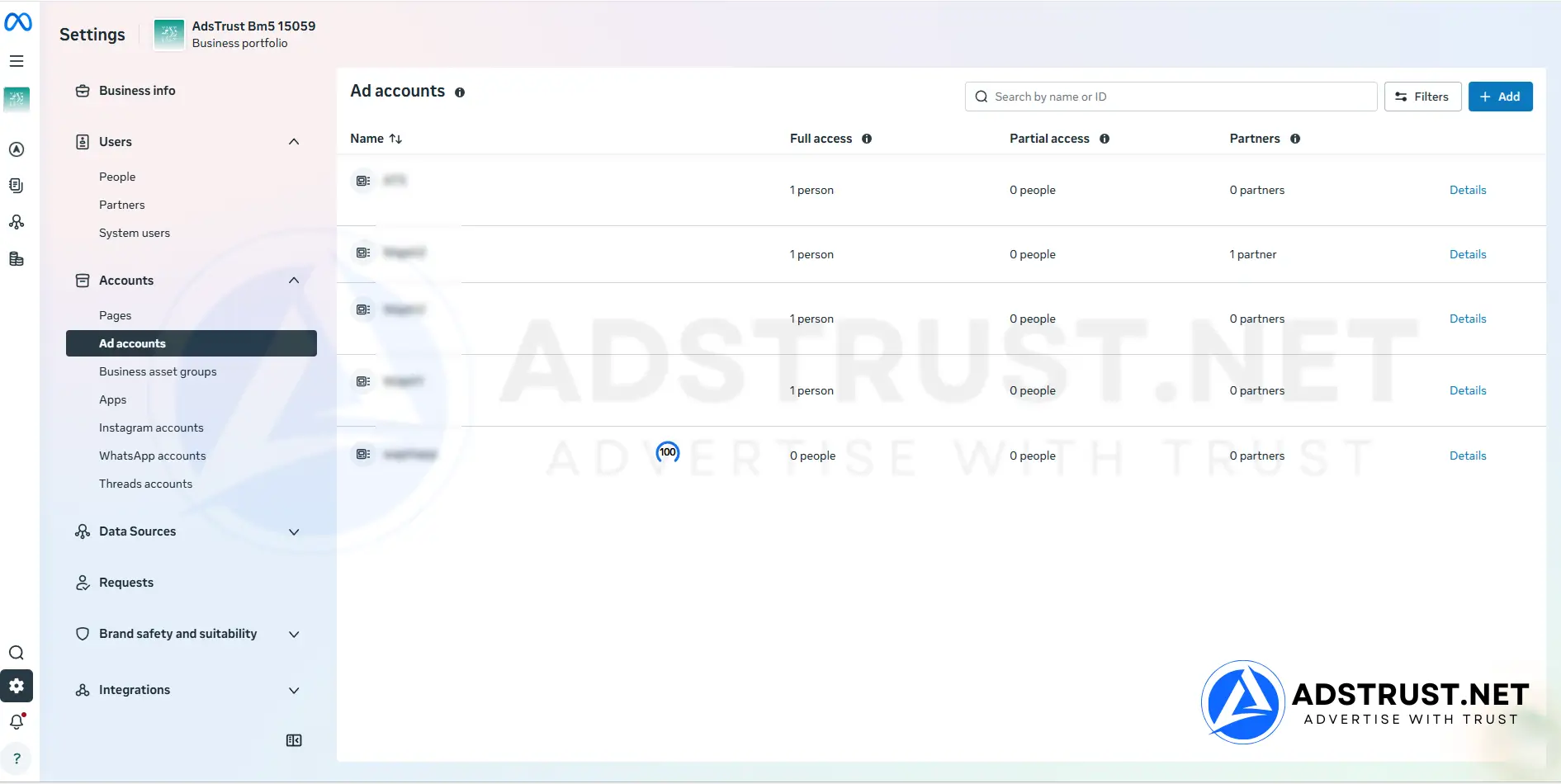
BM5 is a Facebook Business Manager with five ad accounts, running at either a $250 daily limit or a No Limit configuration.
It is built for advertisers past the testing stage, who need to spread spend across separate accounts instead of concentrating every campaign, and every risk, in one.
Scaling Facebook ads too early is one of the fastest ways to burn accounts. Pushing a single ad account harder than its history supports is what triggers most reviews.
And when that account goes down, it takes every campaign inside it with it.
BM5 exists for the stage in between: past validation, not yet running an agency-scale portfolio. You want to scale, but you want the damage contained when something breaks.
What Is BM5 Facebook Business Manager?

BM5 is a Facebook Business Manager that includes five advertising accounts under one business portfolio.
That structure lets you distribute campaigns deliberately, instead of forcing everything through a single account. Each of the five can be warmed independently, so Meta reads a consistent pattern on each one rather than erratic behavior on one.
The practical benefit is isolation. If one ad account is restricted, the other four keep running and the campaigns inside them are untouched.
That is the difference between losing one test and losing a week of revenue.
Ad Accounts and Spending Limits Explained

BM5 ships in two configurations: a $250 daily spending limit per ad account, or a No Limit setup.
With five accounts available, you can grow total spend by bringing more accounts online in parallel, rather than pushing one account’s daily budget up sharply. That sharp jump is the pattern Meta is most likely to flag on an account without much history.

Where to check it yourself: Business Settings → Business info → Ad Account Creation Limit.
Warm-up still matters at the No Limit tier. No Limit removes the ceiling, not the review.
If you want the day-by-day version, our Facebook ad account warm-up schedule sets out what a careful first few weeks look like.
BM5 is usually the step up from one of these smaller setups:
- BM1, a single ad account with a $50 to $250 ceiling.
- BM350, a single account at $25 to $50, often kept afterwards as a Pixel and Page holder.
How Advertisers Actually Use Five Ad Accounts

Five accounts only help if each one has a job. Splitting campaigns at random across five accounts gives you five weak signals instead of one strong one.
In our team’s experience, the split that holds up looks roughly like this:
- One proven account. Carries winning campaigns at steady spend. Nothing experimental touches it.
- Two testing accounts. New creatives and audiences on small budgets. These are expected to take the hits.
- One expansion account. A new offer, market or funnel that has not yet earned a place alongside the winners.
- One reserve. Warmed but mostly idle, so there is somewhere to move if another account is restricted.
The reserve is the part most advertisers skip, and later wish they had not.
An account that has been quietly warming for weeks is far more useful on the day you need it than one created in a panic, with no history, while campaigns are down.
Advertisers who outgrow this pattern usually move to a BM50 Facebook Business Manager, where each client or offer can sit in its own account.
How BM5 Compares to BM1 and BM10
BM5 is where the No Limit option first appears in the range. That ceiling, not the jump in account count, is usually the real reason advertisers move up to it.
| Tier | Daily spending limit | Ad accounts | Best for |
|---|---|---|---|
| BM1 | $50 or $250 | 1 | One account with a much higher daily ceiling |
| BM5 (this page) | $250 or No Limit | 5 | Scaling once $250+ per day is the real need |
| BM10 | $250 or No Limit | 10 | Cost-efficient scaling with real capacity |
Two separate things scale here.
The number of ad accounts controls how much you can isolate, keeping a failing campaign away from a working one.
The daily spending limit controls how fast you can scale at all, and it is the real ceiling. One account at $250 per day carries more spend than three accounts capped at $50. No Limit is the highest ceiling in the range.
When BM5 Is, and Is Not, the Right Choice
BM5 makes sense if you already understand Ads Manager, have at least one offer that converts, and are held back by structure rather than by knowledge.
It is the wrong purchase if you are still learning fundamentals, or still searching for a product that works. Five accounts do not make a losing offer profitable. They spread the loss across five places.
If that is closer to your situation, start with BM350 or BM1, and come back when there is something worth scaling.
Pushing a Business Manager harder than its history supports is one of the more common ways advertisers end up reading our guide to recovering a disabled Business Manager.
At the other end of the range, agencies running many clients under one roof usually need BM50, or at genuine enterprise volume a BM2500 Facebook Business Manager.
For a full map of which tier fits which stage, see our complete guide to Business Manager types, limits and safe usage.
What You Receive, Delivery, and Warranty
AdsTrust delivers BM5 as a digital advertising asset, configured exactly as described below. There is no physical shipping and no hidden capacity.
| What you get | Details |
|---|---|
| Ad accounts | 5, under one business portfolio |
| Daily spending limit | $250 per ad account, or a No Limit configuration |
| Delivery time | Instant to 24 hours. Up to 48 hours if extra verification is required |
| Delivered via | Telegram or email, to the contact details you provide |
| Warranty, standard setup | At the time of delivery: the Business Manager must be active, accessible and in working condition |
| Warranty, No Limit setup | The advertised spend limit is covered for 3 days after delivery |
| Refunds | Replacement within the warranty period. No refunds after delivery |
| Payment | USDT (TRC20 or ERC20), BTC or ETH. Full payment before delivery, no chargebacks |
| Support | Online 24/7, fastest via Telegram @adstrustnet |
Two things are worth being blunt about.
First, log in and inspect the Business Manager as soon as it arrives. On the standard configuration the warranty covers the condition it is delivered in, so the check on arrival is the moment that matters.
Second, nobody can promise an account will never be restricted. A clean, correctly configured Business Manager gives you a better starting position, not immunity.
How long it lasts depends on how you use it, and on Meta’s policies at the time. Full terms are on our warranty policy page.
If long-term stability matters more to you than immediate capacity, some buyers start with a BM Verified Facebook Business Manager and create ad accounts themselves.
Our honest answer on whether buying a Business Manager is safe and legal covers what actually gets accounts flagged.
Frequently Asked Questions
Does BM5 come with five ad accounts?
Yes. BM5 is delivered with five ad accounts under one business portfolio.
You can confirm the ad account creation limit yourself under Business Settings, Business info, before you spend anything.
What is the difference between the $250 and No Limit versions?
The $250 configuration caps each ad account at $250 of spend per day. The No Limit configuration removes that cap.
No Limit removes the ceiling, not the scrutiny. Meta still reviews the account, and a sudden jump in spend is still read as a risk signal.
Can I run all five ad accounts from day one?
You can, but it is rarely the best move. Accounts that go from zero to full budget immediately draw attention.
Bringing them online in sequence, with one account carrying steady spend while the others start small, produces a more stable pattern.
If one ad account is restricted, do I lose the others?
No. A restriction normally applies to the specific ad account rather than the whole Business Manager.
The other four keep running, which is the main structural reason to buy five accounts instead of one.
Should I buy BM5 or BM10?
Choose BM5 if five accounts cover your current offers with one held in reserve.
Choose BM10 if you already run more offers than five accounts can isolate, or expect to within a couple of months. Buying the larger tier once is less disruptive than migrating later.
Do I need a Fanpage and Pixel as well?
You need a Page to run most ad formats, and a Pixel to measure conversions.
Many advertisers keep both in a separate low-limit Business Manager, so the assets survive if a spending account is restricted.
What warranty applies to BM5?
For the standard configuration, the warranty applies at the time of delivery. The Business Manager must be active, accessible and in working condition.
For a No Limit setup, the advertised spend limit is covered for 3 days after delivery. Replacements, not refunds, apply within the warranty window.
BM5 fits one situation well: you have something that converts, and what is holding you back is structure rather than budget or knowledge.
If that is not you yet, a smaller tier costs less and teaches the same lessons.
The price and order button are at the top of this page. If you are unsure whether BM5 or a BM10 fits what you are building, message the team on Telegram before ordering.
Written by Victor Kwang, Meta advertising specialist and blog lead at AdsTrust Global Pte. Ltd. (Singapore). The AdsTrust team has worked in Meta advertising since 2017. Spending limits, review timings and account behavior described on this page reflect what we see in practice. Meta can change them at any time.





Reviews
There are no reviews yet.