
TL;DR: Business Manager verification typically completes in 2 to 7 days, but delays of weeks or months usually come from name/address mismatches, blurry documents, or queue backlogs, not from the review itself. Check Business Settings and Security Center before assuming it’s stuck, and avoid resubmitting since that often restarts the queue from zero.
What Does “Verification Pending” Actually Mean?
“Verification pending” means Meta has received your Business Verification submission and it is sitting in a review queue.
It is different from “in review,” which means a human or automated system is actively checking your documents.
It is also different from a billing hold or an Account Quality restriction, which are separate systems entirely.
Confusing these three is the number one reason people take the wrong action while waiting.
Under Meta’s advertising standards, advertisers may be asked to verify business identity, location, and ownership before certain features unlock.
That verification layer is separate from your ad account’s spending status and separate from any policy violation flags.
How Long Should Business Verification Actually Take?
Meta’s stated expectation is roughly 2 to 7 business days for most straightforward submissions.
In practice, our team has seen cases stretch to two or three weeks, and in rarer cases, over a month, especially during high-volume periods.
There is no official published SLA guaranteeing a fixed number of days, so treat any timeline as a typical range, not a promise.
| ,Timeline | |
| Straightforward, clean submission | 2 to 7 days typically |
| Minor document or name issues | 1 to 3 weeks in many cases |
| Complex business structures (LLC, DBA, multi-entity) | Several weeks, sometimes longer |
| Queue backlog periods | Highly variable, unpredictable |
If you are past three to four weeks with zero status change, that is when active troubleshooting makes sense, not passive waiting.
What Actually Causes Long Verification Delays?
Most long delays trace back to a handful of silent blockers rather than Meta simply being slow.
The most common is a mismatch between the legal business name on your documents and the name entered in Business Settings.
Even small differences, like a missing “LLC” suffix or a punctuation difference, can stall automated matching.
- Business name or address doesn’t exactly match registration documents
- Document photos are blurry, cropped, or missing required fields
- Business address on file doesn’t match the utility bill or lease shown
- Website domain doesn’t clearly match the business name being verified
- Multiple admins editing business details while verification is pending
- General queue backlog unrelated to your specific submission
DBA (“doing business as”) setups and multi-entity structures fail more often because the legal name on file rarely matches the trading name shown on marketing materials.
LLCs sometimes fail when the state registration document uses a slightly different formatted name than what was typed into the form.
Where to Actually Check Your Verification Status
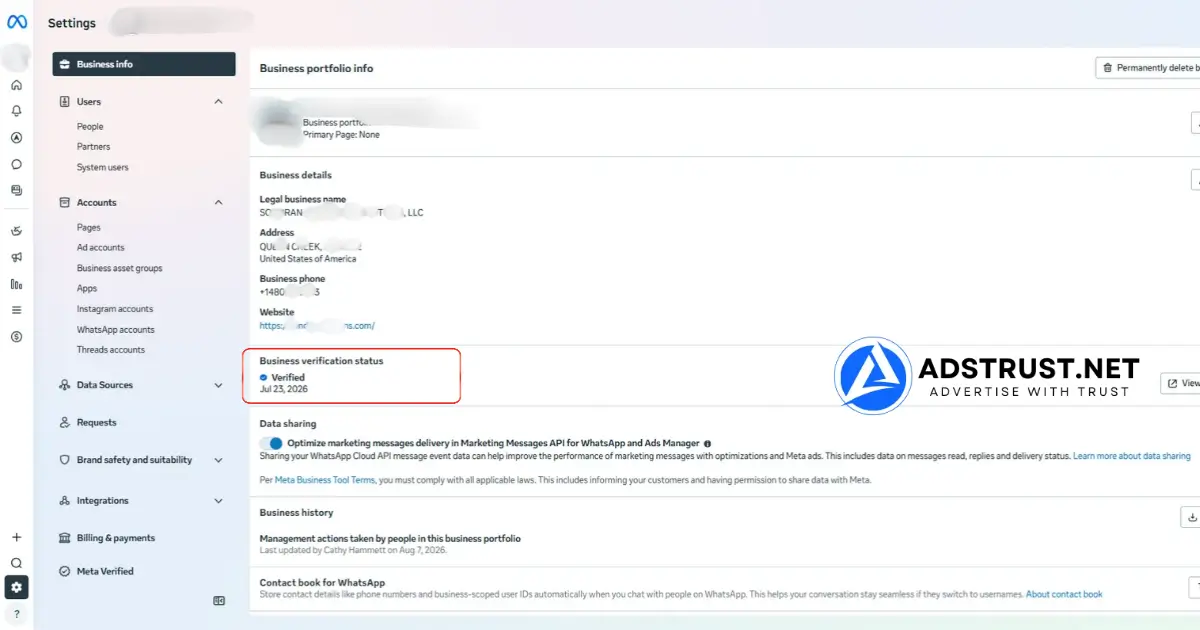
Checking the right place matters more than checking often, since three different dashboards can show different pieces of the puzzle.
Business Settings
This is where the core Business Verification status lives, usually under the security or business information section.
Security Center
Security Center often surfaces identity or document related flags that don’t appear anywhere else in Business Settings.
Support Inbox
This is the most overlooked spot; Meta sometimes requests additional information here without triggering an obvious notification elsewhere.
Checking all three before assuming the process is stuck can save weeks of pure waiting.
Business Verification vs Billing Verification vs Account Quality: Know the Difference
These three systems get confused constantly, and each one needs a completely different fix.
| ,Purpose | Where seen | Typical fix | |
| Business Verification | Confirms legal identity and ownership of the business | Business Settings / Security Center | Correct document mismatch, wait, or contact support |
| Billing Verification | Confirms payment method ownership and validity | Ads Manager billing section | Update payment method or verify card/bank details |
| Account Quality restriction | Reflects ad account or asset policy standing | Account Quality tab | Review flagged ads, appeal if applicable |
If you address a billing issue while the actual block is a Business Verification mismatch, nothing will change and the pending status will remain unchanged.
This distinction matters even more for agencies managing several Business Managers, since one team member might be reading the wrong dashboard entirely.
Our guide on Facebook Account Quality breaks down what Account Quality actually flags, separate from verification.
Safe Diagnostic Steps Before You Touch Anything
Run through a short diagnostic pass before contacting support or, worse, resubmitting documents blindly.
- Compare your legal business name character by character against the registration document
- Reopen the document images at full resolution and check every corner is visible, not cropped
- Confirm the website domain listed matches the business name being verified
- Log out of all admin accounts, clear cache, and log back in on one clean browser profile
- Check whether a second admin recently changed the business name, address, or website
- Disable ad blockers or business-related browser extensions that may interfere with the dashboard
None of these steps require restarting the verification itself, they only rule out simple, fixable errors first.
Why You Should Not Resubmit or Create a Duplicate Submission
Resubmitting while a request is still pending is one of the most common mistakes that extends delays further, not shortens them.
A new submission often resets the position in the review queue, meaning any progress already made is lost.
Duplicate submissions can also confuse the review system into flagging inconsistent data across two active requests.
The safer path is confirming the current submission is genuinely stalled, not just slow, before considering a resubmission at all.
If your Business Manager has been fully disabled rather than just pending, that’s a different problem covered in this recovery guide.
Multiple Admins and Team Workflows: A Hidden Delay Source
Agencies and media buying teams face a specific risk that solo operators rarely encounter.
When more than one admin has edit access, someone can unknowingly change the business name, address, or primary page while verification is pending.
Each of those edits can silently reset the matching process against your submitted documents.
- Freeze non-essential edits to business info while verification is active
- Assign one single owner responsible for verification related changes
- Keep a shared log of who changed what and when, for faster troubleshooting
- Avoid adding new admins mid-verification if it can be postponed
Teams running several Business Managers at once should read how agencies build BM systems for a cleaner structural approach that avoids this exact problem.
Documents That Commonly Fail: What to Prepare Before You Submit
Preparing the right documents before submission avoids most of the delays covered in this guide entirely.
- Government-issued business registration certificate with the exact legal name
- Utility bill or lease agreement showing the same address on file, dated recently
- Full, uncropped, high-resolution scans, not phone photos with glare
- A website domain that clearly and visibly matches the business name
- Consistent formatting of the legal name across every single document
Utility bills and government ID scans fail most often when they are more than a few months old or when the address format differs slightly from what’s typed into the form.
Region matters too, since documentation standards accepted for a US LLC differ from what’s typically expected for an EU registered entity or a Southeast Asian sole proprietorship.
When and How to Escalate to Meta Support
Escalation makes sense once you’ve confirmed the submission is genuinely stalled, not just moving through a normal queue.
A reasonable trigger point is three to four weeks of zero status change after confirming documents are correct and admins haven’t altered business info.
- State the exact date of original submission
- List the specific business name and domain being verified
- Note whether Business Settings, Security Center, and Support Inbox all show no new requests
- Confirm no recent edits were made to business name, address, or website
- Ask specifically whether additional information is needed, rather than just “checking status”
Clear, specific notes get faster responses than vague messages asking “why is this taking so long.”
General procedures around Meta’s business tools are outlined at the Meta Business Help Center, which is the only place to confirm current support pathways.
Security Red Flags: Beware of Anyone Offering to “Speed Up” Verification
No legitimate third party can accelerate Meta’s internal Business Verification queue, full stop.
Anyone offering to “fast-track” your pending verification for a fee is almost certainly running a scam or attempting to phish account credentials.
The same caution applies to unsolicited messages claiming to be Meta support asking for login details outside official channels.
Before trusting any seller or service claiming special access to Meta systems, it’s worth reading how to verify a Facebook account seller is legitimate.
A Faster Alternative While You Wait
Sometimes the practical business decision is to keep advertising moving on a separate, already-verified Business Manager while the pending one clears.
That approach avoids pausing campaigns for weeks over a verification queue you have no direct control over.
If waiting on verification is blocking active campaigns, AdsTrust’s verified Business Manager comes already checked and stable at delivery, so you can keep running ads while your original submission clears. This is not a workaround for compliance, it’s simply a clean, working asset while you wait. Reach out via Telegram at @adstrustnet for details before you buy.
For teams deciding whether verified infrastructure makes sense before scaling further, this guide walks through the tradeoffs in more detail.
Frequently Asked Questions
How long does Facebook Business Manager verification usually take?
Most straightforward submissions complete within 2 to 7 days, but real-world cases can stretch to several weeks depending on document accuracy and queue volume.
Why is my business verification taking so long?
The most common causes are a name or address mismatch versus your registration documents, unclear document scans, or a general review queue backlog unrelated to your specific case.
Can I speed up Facebook business verification?
There is no official way to speed up the process, and anyone offering to fast-track it for a fee should be treated as a scam risk.
What documents do I need for Meta business verification?
Typically a government-issued business registration certificate and a supporting document like a utility bill, both showing a legal name and address that exactly match what’s entered in Business Settings.
What does ‘verification pending’ vs ‘in review’ mean?
Pending means your submission is sitting in the queue awaiting review, while in review means it is actively being checked, either by a system or a human reviewer.
Should I resubmit if verification is pending too long?
Not immediately; resubmitting while a request is active can reset your position in the queue, so confirm it’s genuinely stalled first through Business Settings, Security Center, and Support Inbox.
How do I check my business verification status?
Check Business Settings for the core status, Security Center for identity-related flags, and Support Inbox for any hidden requests for additional information.
What causes business verification to be rejected?
Common causes include a legal name mismatch, blurry or cropped documents, an outdated address on file, or a website domain that doesn’t clearly match the business name.
Is there a way to contact Meta about slow verification?
Yes, through the Meta Business Help Center, where including your submission date, business name, and confirmation that no info requests are pending helps get a faster response.
Can multiple admins cause verification delays?
Yes, if another admin edits the business name, address, or website while verification is pending, it can silently reset the matching process against your submitted documents.
Written by Victor Kwang, Meta advertising specialist and blog lead at AdsTrust Global Pte. Ltd., drawing on the team’s Meta advertising experience since 2017. See more from Victor on the author page.