
TL;DR: When the whole Business Manager is restricted rather than a single ad account, Meta cites the same “Account Integrity” automation reason and offers an Application for review button with a countdown.
AdsTrust files these appeals, with around a 90% success rate on this restriction type. The button must still be present, and the process requires a session cookie from the Business Manager admin profile. We explain exactly what that means and how to close it off afterwards.
When the Business Manager Itself Goes Down
This is the heavier version of the same sweep.
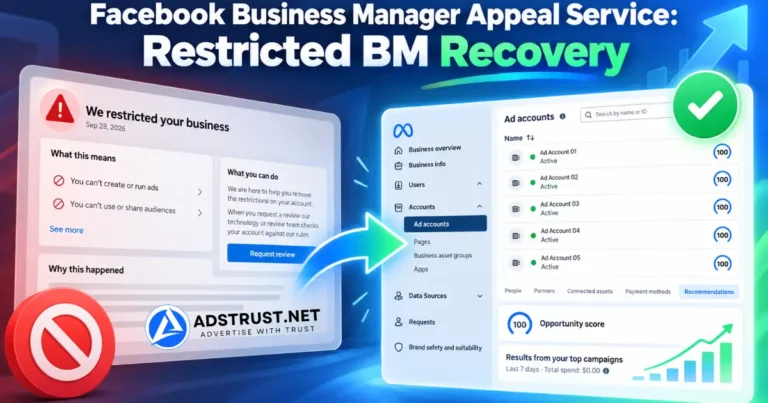
Instead of losing individual ad accounts, you open Business Suite and find We have restricted your business account across the whole portfolio.
Meta gives the same reason it gives for ad accounts:
It looks like this account was created or used with an automation that doesn’t follow our rules. This goes against our Advertising Standards on Account Integrity.
Examples of things we don’t allow: automations where a large amount of activity is quickly created by a machine, automations that mimic human activity, automations which take away from authentic, human activity.
The practical difference is scope. Every ad account, Page, pixel, and catalog under that Business Manager stops being usable for advertising at the same moment.
If only the ad accounts are affected and the Business Manager still works, the cheaper and simpler route is our ad account appeal service. Check which one you are actually dealing with before going further.
The One Requirement
The restriction screen shows a button reading Application for review or Request review, with a line underneath telling you how many days remain.
That button has to be there. It is the entire eligibility test.
If it is missing, the review window has either expired or already been used, and the case is closed. We will tell you that before taking anything from you.
As with ad accounts, we suggest not submitting the review yourself on this restriction type. A review that comes back final removes the button, and after that there is nothing left for anyone to appeal.
How the Process Runs
- Contact us on Telegram at @adstrustnet with the current state of the Business Manager and a screenshot of the restriction screen.
- We assess and quote. Pricing is set per Business Manager after we look at the case, not from a fixed list.
- You send the Business Manager ID of the restricted portfolio.
- You send a session cookie from the profile that holds admin on that Business Manager. This is the part that needs explaining, and the next section does that.
- We file the appeal and report the outcome back to you.
- You invalidate the cookie using the steps below, which takes about a minute.
Across the Business Manager cases we have processed on this restriction type, roughly 90% come back reinstated. That figure is from our own records, not from Meta, and it is not a promise about your specific portfolio.
About the Cookie, Honestly
Most customers hesitate at this step, and they are right to. A session cookie is what keeps you logged in, so handing one over is handing over the ability to act as you.
We have written elsewhere on this site that you should never install a browser extension that can read your Facebook session. We still mean that, and it is worth explaining why this is not the same thing.
An extension takes the token silently, keeps taking it, and you never learn who receives it or when. You cannot see it happen and you cannot time-box it.
Here you know who has it, why, for which single job, and you end it yourself when the job is done. Those are different risks, and the second one you control.
What we commit to, in writing before you send anything:
- The cookie is used only to file the appeal for the Business Manager you named.
- It is never shared with anyone outside AdsTrust and never used for any other purpose.
- AdsTrust Global Pte. Ltd. accepts responsibility for the handling of what you send us.
- We tell you the moment the case is closed so you can revoke it immediately.
How to Kill the Cookie When We Are Done
Do this in order. The order is the part people get wrong.
- Open Facebook, go to Settings and privacy, then Password and security, then Where you’re logged in.
- Log out of all other sessions. This is the step that actually invalidates the cookie you sent us.
- Then change your password. When Facebook asks whether to stay logged in elsewhere, choose to log out everywhere.
- Turn on two-factor authentication with an authenticator app if it is not already on.
Changing the password first and stopping there is the common mistake. Facebook will offer to keep existing sessions alive, and if you accept, the old cookie keeps working.
End the sessions first and the cookie is dead whatever happens next. New ones are issued to your own devices when you log back in.
If you are not comfortable with any of this, say so before you pay. We would rather lose the job than have you agree to something you have not thought through.
What This Service Is Not
Being clear about the limits is more useful than a sales pitch.
- It is not a fix for a genuine policy violation. If the Business Manager was running content Meta prohibits, an appeal is not the answer and we will say so.
- It is not a guarantee. Roughly one case in ten does not come back.
- It does not work without the button. No button, no appeal, no exceptions.
- It does not protect the portfolio afterwards. A reinstated Business Manager can be restricted again if the underlying behavior does not change.
On that last point, a reinstated Business Manager should be treated like a new one for a while. Our guide on warming up a Business Manager properly applies directly, and why Business Managers get disabled covers the patterns worth avoiding.
Keeping Campaigns Alive During the Wait
Appeals take as long as Meta takes. If client spend is stopped in the meantime, that cost usually outweighs the appeal itself.
Most agencies that handle this well keep a second Business Manager ready before they need it, rather than scrambling for one mid-restriction.
If you do not have one, our business-verified Business Manager is the option most people in this position take, and the full Business Manager range covers lighter tiers.
FAQ: Business Manager Appeal Service
What does “We have restricted your business account” mean?
Meta has restricted the entire Business Manager, so no asset under it can create or run ads or use audiences.
In this wave the stated reason is automation under Advertising Standards on Account Integrity, regardless of whether any automation was used.
What is your success rate?
Around 90% on this restriction type, based on our own casework rather than any figure published by Meta.
It applies to portfolios hit by the automated sweep, not to genuine policy violations.
Why do you need a cookie instead of partner access?
A restricted Business Manager cannot grant partner access, which is the route we use for ad account appeals.
With the portfolio locked, the appeal has to be filed from an admin session on that Business Manager.
Is sending a cookie safe?
It carries real risk, and we are not going to pretend otherwise. What makes it manageable is that you know who holds it, for how long, and you end it yourself.
Log out of all sessions first, then change your password. That invalidates it completely.
Is changing my password enough on its own?
Not reliably. Facebook can offer to keep existing sessions signed in when you change a password.
End every other session under “Where you’re logged in” first, then change the password. That order leaves nothing behind.
How much does it cost?
We quote per Business Manager after looking at the case, because the work varies with the state of the portfolio.
Send the details on Telegram and you get a specific figure rather than a range.
Can you appeal if the review button is gone?
No. The button is the only entry point into the review process.
Once it disappears, the decision is final and no service can reopen it.
What happens to my Pages and pixels?
They stay attached to the restricted Business Manager and become usable again if the appeal succeeds.
Do not try to move them out while a review is pending. Asset movement during an open case is the kind of change that complicates it.
If your restriction screen still shows the review button, the window is open. Send the Business Manager state and a screenshot to @adstrustnet on Telegram and you will get an eligibility answer and a quote the same day.
Written by Victor Kwang, Meta advertising specialist and blog lead at AdsTrust Global Pte. Ltd., Singapore. See more from Victor on the author page.