
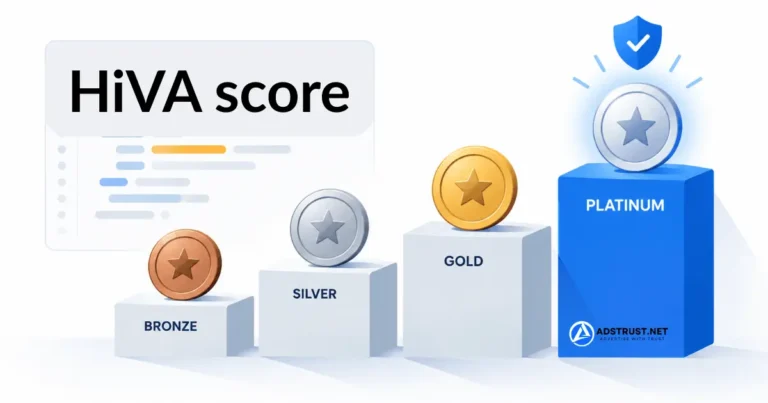

TL;DR: The HiVA score is advertiser shorthand for a hidden trust rating Meta attaches to your advertising assets. No dashboard shows it, but you can read the underlying field yourself.
Open your ad account in Ads Manager, press Ctrl+U to view the page source, then press Ctrl+F and search for
trust_tier. You will see a value such as"trust_tier":"TIER_2". A higher number means Meta currently treats the account as more trusted.
Buyers ask us about this more than almost anything else, and usually in the same form: “what is the HiVA score of this BM?”
It is a fair question. It is also one that deserves an honest answer rather than a sales pitch, because a lot of what circulates about HiVA online is guesswork repeated until it sounded like fact.
This guide covers what the score actually is, how to read it yourself in under a minute without installing anything, and what it does and does not tell you.
What the HiVA Score Actually Is
HiVA is short for High Value Advertiser. It is the name the advertising community gave to an internal trust rating that Meta applies to advertising assets.
Two things need saying clearly before anything else.
First, Meta has never published documentation for it. There is no official page describing a HiVA score, no support article, no named tiers. Everything advertisers know about it comes from observation and from fields that appear in Meta’s own front-end code.
Second, the name and the field are not the same thing. “HiVA” is community terminology. What you can actually verify with your own eyes is a field called trust_tier that Meta ships inside the Ads Manager page source.
We treat the field as real because you can read it. We treat the interpretation around it as informed observation rather than documented policy, and we would suggest you do the same with anyone who tells you otherwise.
How to Check Your Trust Tier HiVA score Facebook
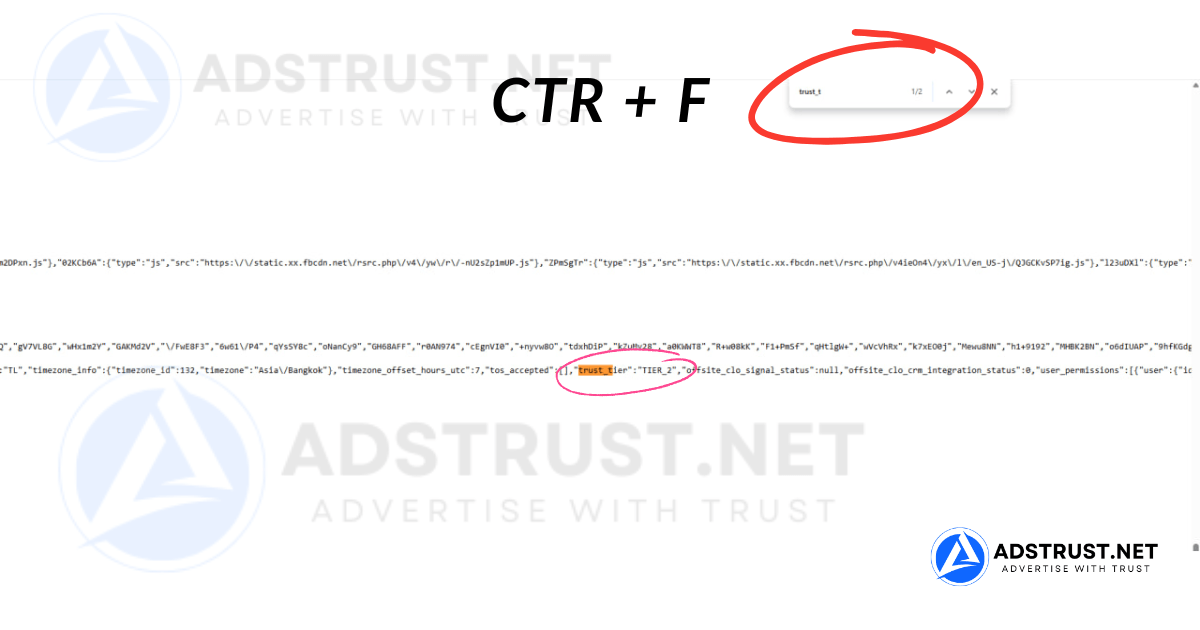
No tools. No extensions. Nothing to install. Four steps.
- Open the ad account you want to check inside Meta Ads Manager, on desktop, logged in as normal.
- Press Ctrl+U to open the page source. On a Mac, use Cmd+Option+U. The address bar will change to
view-source:https://adsmanager.facebook.com/adsmanager/manage/campaigns?act=... - Press Ctrl+F and search for
trust_tier. - Read the value next to it. It looks like this:
"trust_tier":"TIER_2"
That is the whole method. The value sits in the same block as other account settings such as timezone_info and tos_accepted, so if you can see those, you are looking in the right place.
A few practical notes from doing this on a lot of accounts.
- It is per ad account, not per Business Manager. The URL carries an
act=parameter. Check each ad account separately rather than assuming one value covers the whole BM. - Search may return more than one match. The first one in the account settings block is the one you want.
- If nothing is found, let the page finish loading before pressing Ctrl+U, and make sure you are on the campaigns view rather than a settings sub-page.
- Meta can rename or remove this field at any time. It is internal front-end code, not a supported feature. If it disappears one day, that is not a bug on your side.
Why We Do Not Recommend Trust Score Extensions
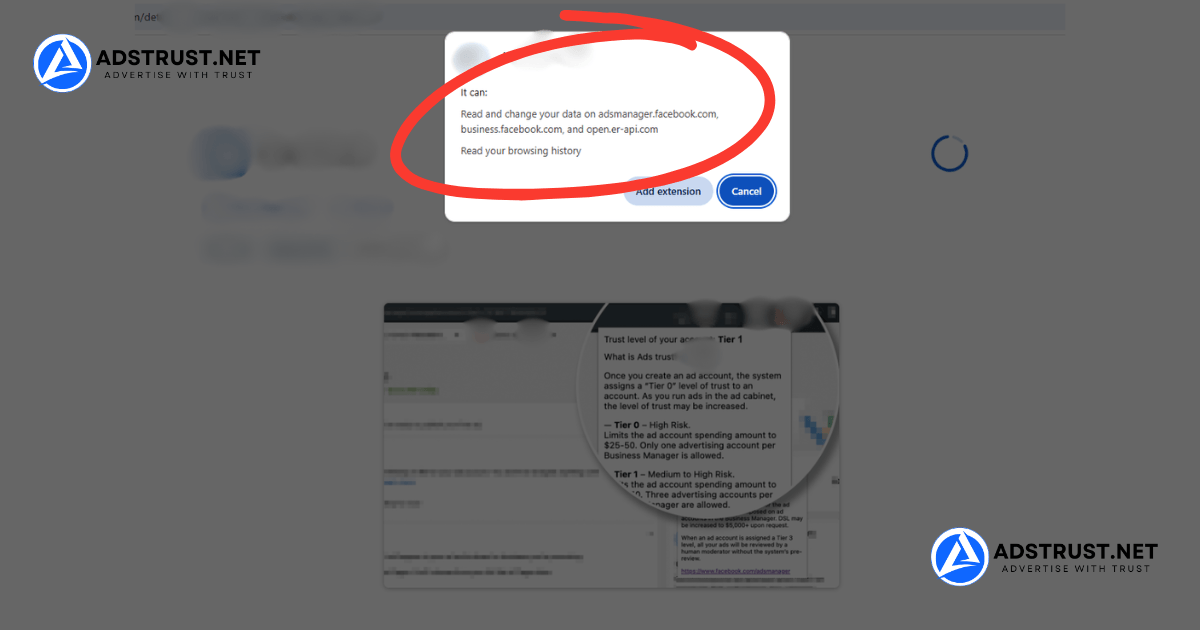
Most guides on this topic will point you at a browser extension that reads the value for you and displays it in a nice badge.
We deliberately do not, and the reason is worth understanding.
An extension that reads your Ads Manager page needs permission to read that page. In practice that usually means permission to read every Facebook page you are logged into, including your session, your Business Manager, your payment settings, and every client asset attached to it.
You are installing that into the exact browser profile that holds the asset you are trying to protect.
The specific risk is your session token. Once an extension can read Facebook pages, it can read the token that keeps you logged in.
That token can be sent to a server you have no visibility into. Whoever holds it can act as you, without needing your password and without triggering a login alert.
From there, losing the Business Manager is not a hypothetical. It is the normal outcome.
There is also the question of who wrote the tool. Most trust score extensions come from anonymous developers rather than established companies with a name to lose.
You cannot audit the code, you cannot check who receives the data, and there is nobody to hold responsible if it goes wrong.
Even if a given extension is honest today, extensions get sold, updated, and taken over. The permission you granted stays granted.
If You Already Installed One
Do not panic, but do not leave it either. Work through this in order.
- Remove the extension from every browser profile you use for advertising.
- Log out of all active sessions. In Facebook, go to Settings, then Security and Login, and end every session you do not recognize. This is what invalidates a stolen token.
- Change your password after ending those sessions, not before.
- Turn on two-factor authentication if it is not already on, and use an authenticator app rather than SMS.
- Review admin access on your Business Manager and Pages, and remove anyone you did not add yourself.
The order matters. Changing the password while a stolen session is still active does less than people assume.
The Ctrl+U method reads the same value, installs nothing, and grants nobody access to anything. It takes about twenty seconds longer. That trade is easy.
This is the same reasoning behind how we handle account delivery and why we cover what to look for when buying a Business Manager safely. The cheapest convenience is rarely the cheapest outcome.
What TIER_1, TIER_2, and TIER_3 Mean
The values are numbered, and a higher number is the better position.
TIER_1is the entry level. Typically newer accounts, or accounts carrying a policy history.TIER_2is the middle. A settled account with a reasonably clean record.TIER_3is the highest value we have seen in the field. Established accounts with long, consistent, clean activity.
Most accounts you will check sit at TIER_1 or TIER_2. TIER_3 is genuinely uncommon.
How Bronze, Silver, Gold and Platinum Fit In
You will see the tiers discussed as Bronze, Silver, Gold and Platinum far more often than as TIER_1 to TIER_3.
Those names are community shorthand. Meta does not publish them, and they do not appear anywhere in the page source.
In our reading, they line up against the values you can actually read like this:
| Community name | Value in page source | Typical profile |
|---|---|---|
| Bronze | TIER_1 | New accounts, or accounts carrying a policy history |
| Silver | TIER_1 | Settled, but still building a record |
| Gold | TIER_2 | Clean record with consistent spend |
| Platinum | TIER_3 | Long, consistent, clean activity. Uncommon |
Note that four names map onto three values. Bronze and Silver are both read as TIER_1, which is why two accounts described very differently can show the same value.
Treat this table as our interpretation, not as documentation. The part you can verify for yourself is the value in the page source.
Beyond that ordering, be careful what you accept as fact.
Plenty of articles attach confident monthly spend thresholds to each tier, or claim that the top tier comes with a direct Meta representative. Those specifics are not published by Meta, and most of the articles making them are selling an account.
What we are comfortable saying, based on accounts we handle:
- The field is ordered, so a higher tier is a better starting position than a lower one.
- A tier is a snapshot of how Meta currently reads the account, not a permanent grade.
- It moves. An account does not keep a tier because it once earned it.
- Nobody outside Meta can set it, raise it on request, or guarantee it will hold.
Anyone offering to sell you a specific tier as a fixed, permanent property of an account is describing something they do not control.
What the Trust Tier Changes in Practice
In our team’s experience, the tier correlates with how much friction an account meets rather than with how well campaigns perform.
Accounts sitting at a higher tier tend to clear ad review faster, hit fewer surprise holds, and move through spending limit increases with less resistance.
Accounts at a lower tier tend to get looked at harder. The same creative that passes quietly on one account can sit in review on another.
What the tier is not is a performance setting. It does not lower your cost per result, and it will not rescue a weak offer. Treating a trust tier as a growth lever is the wrong model.
A more useful way to hold it: the tier describes how much benefit of the doubt you start with. What you do after that is still on you. That is also why a strong Business Manager cannot repair a weak ad account on its own.
HiVA Score vs Feedback Score: Not the Same Thing
These two get mixed up constantly, and they measure different things.
| Trust tier (HiVA) | Feedback score | |
|---|---|---|
| Applies to | Ad account inside a Business Manager | Your Page and its customer experience |
| Documented by Meta | No | Yes |
| Where you see it | Page source only, field trust_tier | Account Quality, in the interface |
| Built from | Meta’s internal read of account behavior | Post-purchase surveys from real buyers |
| You can influence it | Indirectly, over time | Directly, by fixing delivery and product issues |
If you want the documented one, start with Account Quality and what it flags. It is visible, it is official, and it is actionable today.
What Moves the Tier, and What You Actually Control
Meta does not publish the inputs, so anyone listing an exact formula is guessing.
What is consistent across the accounts we see is unremarkable and slightly boring:
- Policy history. Repeated rejections and restrictions leave a mark. This is the heaviest factor we observe.
- Consistency. Steady spend on a settled account reads differently from erratic bursts on a new one.
- Payment stability. Failed charges and frequently swapped payment methods attract attention.
- Negative user signals. Hides, reports, and complaints on your ads are feedback Meta acts on.
- Time. Nothing substitutes for an account that has behaved the same way for a long period.
You will notice there is no trick in that list. There is no setting to toggle and no request to file.
The practical version is a careful start and a slow ramp. Our day-by-day warm-up schedule covers what that looks like on a new account, and how to warm up a Business Manager properly covers the BM side.
Can You Buy a Business Manager That Starts on a Higher Tier?
This is where the question usually lands, so here is a straight answer.
An established Business Manager with real history does tend to start from a better position than one created last week. That is the honest case for buying an aged or verified asset rather than starting from zero, and we cover the comparison in aged vs new Business Manager.
AdsTrust carries Business Managers across a wide range, from entry-level options like BM350 up to business-verified and no-limit tiers. You can see the full range on the Business Manager category page.
Two things we will not do.
We will not advertise a tier on a product page. The value moves, and a number published today may not be the number you read after transfer. Printing it would be selling you something we cannot guarantee.
We will not promise that a tier survives the handover. Meta reassesses accounts continuously, including after ownership and usage patterns change.
What we can do is tell you what is actually in stock right now. Higher-tier Business Managers are the ones that move fastest and are frequently unavailable, so the catalog page will not always reflect what we can source this week.
If trust tier matters for your setup, message the team on Telegram at @adstrustnet before ordering and ask what is available. You will get a specific answer about current stock rather than a marketing claim.
FAQ: Facebook HiVA Score and Trust Tier
What is the Facebook HiVA score?
HiVA stands for High Value Advertiser. It is the community name for an internal trust rating Meta applies to advertising assets, surfaced in the Ads Manager page source as a field called trust_tier.
Meta does not document it publicly, so treat descriptions of it as observation rather than policy.
How do I check my HiVA score without an extension?
Open the ad account in Ads Manager, press Ctrl+U to view the page source, press Ctrl+F, and search for trust_tier.
The value appears as text, for example "trust_tier":"TIER_2". Nothing needs to be installed.
Is TIER_2 better than TIER_1?
Yes. The values are ordered and a higher number is the stronger position. TIER_3 is the highest value we have seen.
What it means in day-to-day terms is less friction rather than better performance.
Is Platinum the same as TIER_3?
In our reading, yes. Platinum is community shorthand for the top position, which reads as TIER_3 in the page source.
Gold lines up with TIER_2, while both Bronze and Silver read as TIER_1. Meta does not publish these names, so treat the mapping as interpretation and the page source value as the fact.
Are HiVA score checker extensions safe?
We would not use one. An extension that reads your Ads Manager page can also read your Facebook session token and send it to a server you cannot inspect.
Most are built by anonymous developers rather than established companies. The Ctrl+U method returns the same value and installs nothing.
I already installed one. What should I do?
Remove it, then end every active session under Settings, Security and Login. Ending sessions is what invalidates a stolen token.
After that, change your password, turn on two-factor authentication with an authenticator app, and check the admin list on your Business Manager and Pages.
Why can I not find trust_tier in the page source?
Let the page load fully before pressing Ctrl+U, and check from the campaigns view rather than a settings sub-page.
Some guides tell you to search for a different key name, usually ADS_TRUST. The field we can confirm in the current Ads Manager source is trust_tier, so search for that one.
It is also possible Meta has changed the field again since. It is internal code, not a supported feature, and it can be renamed without notice.
Can I raise my trust tier?
Not directly. There is no request form and no setting.
What appears to help is a clean policy record, steady spend, stable payment details, and time. Nothing faster than that has held up in our experience.
Does a higher tier mean cheaper ads?
Not on its own. You will see claims of specific cost reductions tied to tiers, and we have not been able to verify them.
What we do see is fewer interruptions, and an account that keeps running usually beats one that keeps stopping.
Does the trust tier apply to the Business Manager or the ad account?
The field you can read sits on the ad account. The URL you check contains an act= parameter for that specific account.
Check each ad account separately rather than assuming one reading applies to everything inside the Business Manager that controls them.
Which Business Manager should I buy if trust matters most?
Established and business-verified options start from a better position than newly created ones, but stock on the higher tiers changes week to week.
Message the team on Telegram at @adstrustnet and ask what is available before ordering, rather than choosing from the catalog alone.
Written by Victor Kwang, Meta advertising specialist and blog lead at AdsTrust Global Pte. Ltd., Singapore. See more from Victor on the author page.