
TL;DR: Buying a Facebook Business Manager safely means vetting the seller’s reputation and verification proof, paying through a traceable method, and locking down 2FA plus recovery details the moment you receive access. A trustworthy seller puts warranty windows and replacement terms in writing before payment, not after something breaks.
Use this checklist to judge any seller, including AdsTrust.
What Is a Facebook Business Manager (And How Is It Different From an Ad Account)?
A Facebook Business Manager, now branded under Meta Business Suite, is a container account that organizes ad accounts, Fanpages, pixels, catalogs, and team access under one business identity.
It is not the same as an ad account, which is the billing entity that actually spends money on ads, and it is not the same as Facebook Ads Manager, which is simply the interface used to build and monitor campaigns inside that ad account.
A Business Manager can hold multiple ad accounts, multiple pages, and multiple admins at once, which is exactly why agencies and media buyers treat it as core infrastructure rather than a throwaway login.
| Entity | Purpose | Who controls it |
| Business Manager | Organizes assets: ad accounts, pages, pixels, team roles | Owner/admin of the BM |
| Ad Account | Billing entity that spends the ad budget | Assigned inside a BM or personal account |
| Ads Manager | Dashboard for building and monitoring campaigns | Any user with assigned access |
Read the full breakdown in our Facebook Business Manager complete guide, which covers types, limits, and safe usage in more depth than fits in this buyer’s guide.
Why Do Media Buyers and Agencies Buy Existing Business Managers Instead of Creating New Ones?
Media buyers buy existing Business Managers to skip the slow build-up phase that a brand-new BM has to go through, and to start with an asset that already carries some trust signal instead of a zero-history account that Meta’s automated systems treat with more suspicion.
Creating a BM from scratch is free, but it is not fast, and every fresh BM starts with no track record.
- Time savings: a fresh BM often needs weeks of gradual, low-risk activity before it can run meaningful spend without tripping review flags (based on observations and experience from the AdsTrust team)
- Trust score avoidance: new domains, new payment methods, and new admin accounts all get reviewed more cautiously than an asset with an existing pattern of normal use.
- Ban-history avoidance: buying a clean asset means you are not inheriting a BM that Meta already flagged internally, something you cannot fully verify with a self-created account either.
- Structure at scale: agencies managing several clients often need multiple BMs (BM5, BM10, BM50) with pre-set ad account slots rather than requesting new limits from Meta one at a time.
This is covered in more detail in how agencies build Business Manager systems, which walks through structuring multiple BMs for client work.
What Types of Business Managers Are Sold?
Sellers typically offer four broad categories: new/unverified BMs with no track record, Meta-verified BMs that passed Business Verification, aged BMs that are one to four-plus years old, and unlimited multi-account BMs (BM5, BM10, BM30, BM50, BM2500) built for agencies running many ad accounts at once.
Each tier trades off price against stability and setup speed.
| Type | Typical use case | Ad account capacity |
| New/unverified BM | Testing, low-budget campaigns, single operators | 1 ad account, limited spend cap |
| Verified BM | Businesses needing Meta Business Verification badge and higher trust | Varies, often with higher spend ceiling |
| Aged BM (1-4+ years) | Buyers who want an established history behind the asset | 1 or more, depends on package |
| BM5 / BM10 | Small to mid agencies running several client campaigns | 5 or 10 ad account slots |
| BM50 / BM2500 | Enterprise media buying operations | 50 or 2,500 ad account slots |
If you are unsure which tier fits your stage, this comparison of BM350, BM5, and BM10 breaks down when to size up versus stay lean.
How Do You Buy a Facebook Business Manager Safely? A Step-by-Step Framework
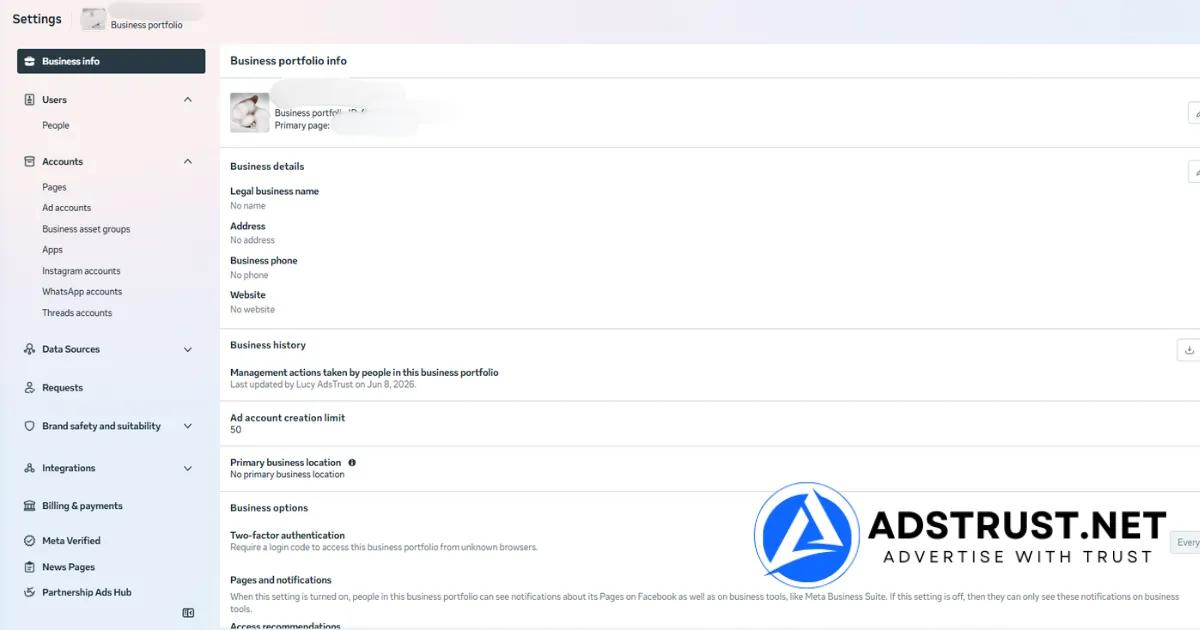
Buying a Business Manager safely follows a repeatable sequence: vet the seller before you talk price, request proof of verification and delivery condition, agree on warranty terms in writing, pay through a traceable method, secure the account the moment access changes hands, and then warm it up gradually instead of spending heavily on day one.
Seller Vetting Checklist
- Does the seller have a real business presence (registered entity, physical or stated office address, consistent contact channels) rather than only a single anonymous chat handle?
- Do they have a track record you can verify, such as a stated number of completed orders or customers served, rather than vague claims?
- Do they publish warranty terms before you pay, not after you complain?
- Do they offer more than one payment channel and explain the confirmation process clearly?
- Do they answer direct questions about the account’s origin, age, and verification status without deflecting?
Verification Proof to Request Before Paying
- Screenshot or screen-share of the Business Manager dashboard showing verification status, ad account count, and current spend limits.
- Confirmation of whether the BM has ever been restricted, and if so, what the current standing is.
- The exact warranty window that applies to that specific product, in writing.
- Clarity on what happens to the warranty once you log in, since most legitimate sellers make the buyer responsible for the account after a successful first login.
Once you have this proof and agreed terms, the transfer itself should be simple: the seller hands over the login and any required 2FA recovery method, you log in within the stated warranty window, and you immediately begin the security steps below.
Which Payment Method Is Safest When Buying a Business Manager?
There is no payment method that eliminates risk entirely in this niche, but the safest combination is a traceable transaction plus a seller who confirms order details through a named channel before you send funds.
Crypto (USDT, BTC, ETH) is the standard in this industry because card-based methods and PayPal frequently freeze or reverse funds tied to digital account sales, which actually increases risk for both sides mid-transaction.
| Method | Chargeback risk | Typical use in this niche |
| Crypto (USDT/BTC/ETH) | None once confirmed on-chain | Industry standard for digital account sales |
| PayPal | High, frequent reversals and freezes on this category | Often restricted or avoided by sellers |
| Wise / bank transfer | Low, but slow and requires KYC-cleared accounts on both ends | Occasionally used for larger enterprise orders |
| Escrow service | Low if the escrow is legitimate and independent | Useful for high-value orders if both parties agree on terms |
AdsTrust accepts USDT (TRC20 or ERC20), BTC, and ETH, confirmed via Telegram, WhatsApp, or email before you send funds, with orders usually confirmed within minutes of payment and delivered within 2-24 hours.
No credit cards are accepted, which removes chargeback disputes but also means you should only pay after the seller has clearly stated the product, price, and warranty terms in writing.
What Should You Do to Secure a Business Manager Right After Buying It?
The first hour after receiving a purchased Business Manager matters more than almost anything else in the process.
Enable two-factor authentication immediately, replace the recovery email and phone number with ones only you control, change the password, and avoid making large structural changes or heavy ad spend in the first few days.
- Turn on 2FA using an authenticator app rather than SMS where possible.
- Replace the recovery email and phone number tied to the account.
- Change the password to something unique, not reused from other accounts.
- Log in from a consistent device and location instead of switching IPs frequently in the first days.
- Warm up ad spend gradually rather than launching a large campaign on day one.
- Avoid renaming the business, swapping payment methods, and adding new admins all at once.
The warm-up phase is where most preventable restrictions happen, and it deserves its own process.
Our detailed walkthrough on how to warm up a new Business Manager properly covers spend pacing, activity patterns, and timing in more depth than a buyer’s guide can cover alone.
What Should a Fair Warranty and Replacement Policy Actually Look Like?
A fair warranty policy states an exact time window, exactly what is covered, and exactly what voids it, published before you pay rather than negotiated after a problem appears.
Vague language like ‘no refunds after delivery’ with no further detail is a red flag; specific, product-by-product terms are what a trustworthy seller provides.
| Product type | Warranty window | What it covers |
| Facebook profile accounts | 24 hours after delivery | Invalid login credentials, or the account getting locked/disabled within 24 hours if not caused by misuse |
| Facebook Business Manager | At time of delivery and inspection | Account is active, accessible, and in working condition |
| Verified BM (Unlimited/NoLimit) | 7 days for verification status, 3 days for advertised spend limit | Verification status and the stated spend limit holding as advertised |
| Facebook ad accounts | 24 hours after delivery | Invalid login or a non-functional account |
AdsTrust follows exactly this structure: the buyer must log in within the stated window, and the login email used is recorded as proof.
After a successful first login, the account becomes the buyer’s responsibility, meaning restrictions caused by the buyer’s own activity (policy violations, aggressive spend, unrelated business use) fall outside warranty coverage.
This is a normal and fair industry standard, not a loophole, as long as it is stated clearly before purchase.
What Are the Red Flags of an Untrustworthy Business Manager Seller?
The clearest red flags are sellers who refuse to show verification proof before payment, demand payment through unofficial or unverifiable channels, offer no written warranty terms, or pressure you to move communication off any traceable channel entirely.
Scam patterns specific to this niche include fake ‘Meta partner request’ emails asking you to accept a business invite that actually hijacks admin access, and fake escrow links that mimic legitimate payment processors.
- No verifiable business presence, only a single anonymous account with no history.
- Refuses to show a screen-share or screenshot of the actual BM dashboard before payment.
- Pushes an unusually large discount to rush the sale before you can vet anything.
- Sends unsolicited ‘partner request’ or ‘business invite’ links via email or Facebook message, a common phishing pattern used to hijack an existing BM rather than sell a new one.
- Vague or missing warranty language, or terms that change after you’ve already paid.
- Insists on payment methods with no confirmation trail and no order reference.
If a purchased or existing BM does end up restricted despite reasonable use, the recovery path matters as much as prevention did.
Our agency playbook for appealing a disabled Business Manager walks through the appeal process in practical terms.
Is Buying a Business Manager Against Meta’s Terms of Service?
Meta’s terms are built around accounts being controlled by the person or business that created and verified them, and unauthorized transfer of ownership sits in a gray area that Meta does not explicitly endorse.
Per Meta’s advertising standards, advertisers are expected to maintain accurate business information and comply with platform policies regardless of how the underlying asset was acquired.
In practice, this means the risk sits with how the account is used after handover, not simply with the fact that it changed hands.
A buyer who secures the account properly, warms it up gradually, and runs compliant campaigns faces meaningfully lower risk than one who inherits an asset and immediately pushes it hard.
Restrictions still happen, and no seller can honestly promise an unbannable account; what a responsible seller can do is deliver a genuinely verified, tested asset and be transparent about the risk that remains.
Understanding why Business Managers get flagged in the first place helps here too, and our breakdown of why Business Managers get disabled covers the most common triggers agencies run into after a purchase.
Can Agencies Use a Purchased Business Manager for Client Work?
Agencies can and regularly do use purchased Business Managers to manage client ad accounts, but it introduces an extra layer of asset liability worth planning for. If a client’s campaigns run inside a BM the agency doesn’t fully control the origin of, restrictions affect the client relationship directly, not just the agency’s own account.
Agencies handling this well typically keep a clear internal record of which BM tier serves which client tier, structure permissions so no single BM becomes a single point of failure, and choose BM5 or BM10 tiers for mid-size client loads rather than cramming everyone into one account.
For agencies scaling past a handful of clients, how many Business Managers a single business really needs is worth reading before consolidating everything into one asset.
Vetting sellers, verifying proof, and negotiating warranty terms takes real time. If you’d rather skip the guesswork, AdsTrust sells Business Managers that are verified and tested before delivery, with warranty terms stated upfront and no vague post-sale surprises.
Is it safe to buy a Facebook Business Manager account?
It can be reasonably safe if you vet the seller, get verification proof before paying, use a traceable payment method, and secure the account with 2FA immediately after handover.
Risk isn’t zero, since Meta’s policies favor original account ownership, but a properly vetted purchase carries meaningfully lower risk than skipping due diligence.
Can Facebook detect a purchased Business Manager account?
Meta cannot directly detect that an account changed hands through a sale, but its automated systems do flag unusual behavior patterns, like sudden logins from new locations, rapid credential changes, or aggressive spend right after a quiet period.
Gradual warm-up and consistent usage patterns reduce this risk significantly.
What happens if my purchased Business Manager gets banned or restricted?
If it happens within the seller’s stated warranty window and wasn’t caused by your own activity, a reputable seller should offer a replacement per their published terms.
If it happens after the warranty window or due to policy violations on your end, the account becomes your responsibility, which is why understanding the appeal process in advance matters.
Is it against Facebook’s terms of service to buy a Business Manager?
Meta’s terms are built around accounts being controlled by their original verified owner, and unauthorized transfer sits in a gray area rather than being explicitly permitted.
Per Meta’s advertising standards, the practical risk centers on how the account is used post-transfer, not merely on the fact that it was purchased.
How do I verify a Facebook Business Manager account before buying it?
Ask for a screen-share or screenshot of the live dashboard showing verification status, ad account count, and current spend limits, and ask directly whether the account has any past restriction history.
A seller unwilling to show this before payment is a clear red flag.
How much does a verified Facebook Business Manager cost?
Pricing varies by tier and capacity.
As a live example, AdsTrust’s Verified Business Manager (long-term, high-trust) is listed at 119 USD, while unlimited multi-account tiers like BM50 or BM2500 cost significantly more due to their higher ad account capacity.
What is the difference between a Facebook ad account and a Business Manager?
A Business Manager is the organizational container holding ad accounts, pages, and team access; an ad account is the specific billing entity that spends money on campaigns.
One Business Manager can hold multiple ad accounts at once, which is why agencies manage assets at the BM level rather than the ad account level.
How long does it take to receive a purchased Business Manager account?
With AdsTrust, delivery is instant after payment confirmation, and crypto payments are typically confirmed within minutes once sent to the provided wallet address. Other sellers’ timelines vary, so ask before paying rather than assuming.
What is an aged Business Manager and why does it matter?
An aged Business Manager is one that has existed for one to four or more years, giving it a longer history than a freshly created BM.
Some buyers believe this history reduces review friction, though Meta’s exact weighting of account age isn’t publicly documented, so it should be treated as one factor among several, not a guarantee.
What payment methods are safest when buying a Business Manager?
Crypto (USDT, BTC, ETH) is the industry standard because it’s traceable and avoids the freezes and reversals common with PayPal for this category.
Whatever method you use, only pay after the seller confirms product, price, and warranty terms in writing through a named channel.
Do sellers offer a replacement or warranty guarantee if the account gets restricted?
Reputable sellers publish specific warranty windows per product type rather than one vague blanket promise.
AdsTrust’s terms, for example, cover the Business Manager at time of delivery and inspection, with a 7-day verification window and 3-day spend-limit window on Verified BM tiers, provided misuse by the buyer isn’t the cause.
Can agencies use a purchased Business Manager to manage client ad accounts?
Yes, and many agencies do, but it adds asset liability since restrictions affect client campaigns directly.
Structuring permissions carefully and choosing a BM tier (BM5, BM10, or higher) that matches client load reduces the chance that one issue disrupts multiple accounts at once.
Written by Victor Kwang, blog lead at AdsTrust Global Pte. Ltd., Singapore. AdsTrust’s specialists have worked in Meta advertising since 2017 and have served 2,000+ customers across 500+ projects, sourcing, testing, and delivering verified Facebook Business Managers, ad accounts, Fanpages, and regional profiles.