
TL;DR: A Facebook Business Manager appeal is a formal request, usually filed through Account Quality or Business Support Home, asking Meta to reverse a disable. Success depends on identifying the exact root cause, submitting clean evidence, and not touching admins or ownership mid-review.
Most reviews resolve in days to a few weeks, but agencies should run a backup account in parallel so campaigns never fully stop.
What’s the Difference Between BM Disabled, Ad Account Restricted, and Profile Suspended?
These three are not the same problem and Meta does not treat them the same way.
A disabled Business Manager means the entire container, its ad accounts, Pages, and assigned people, has lost access.
A restricted ad account usually still exists inside a working BM, but it can’t spend or was capped.
A suspended personal profile is an identity-level action tied to the individual who logs in, and it can drag down every asset that profile administers, even in a separate BM.
Knowing which layer got hit changes what you submit.
Appealing a BM-level disable with only ad-account evidence, or vice versa, wastes a review cycle.
If you’re unsure which layer triggered first, read why Business Manager gets disabled to map the difference before you file anything.
| Issue | What’s actually locked | Typical fix path |
| Business Manager disabled | Whole BM, all linked ad accounts and Pages | BM-level Request Review in Account Quality |
| Ad account restricted | Just that ad account inside a live BM | Ad account review, sometimes billing re-verification |
| Personal profile suspended | The admin’s identity, affects every asset they manage | Profile-level appeal plus ID/photo verification |
| Page restricted | Publishing or advertising rights on one Page | Page-level review, unrelated to BM status |
How Do You File a Request Review for a Disabled Business Manager?
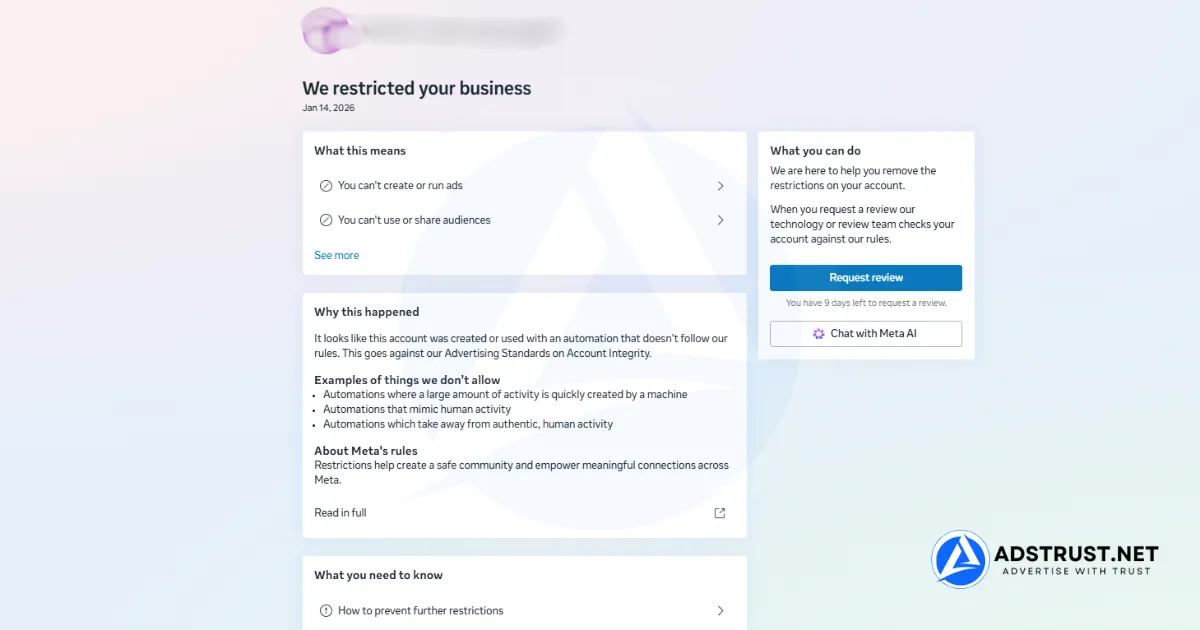
You typically file through Business Support Home or the Account Quality section of Meta Business Suite, which surfaces a Request Review option once Meta has finished flagging the reason.
Meta periodically renames these panels, so treat the labels below as a concept, not a fixed click path.
- Log in to Meta Business Suite with the admin account tied to the disabled BM, not a secondary teammate login.
- Open Business Support Home or Account Quality and locate the disabled Business Manager’s status card.
- Read the stated reason carefully. Meta usually names a policy category (spam, misrepresentation, payment, coordinated harm) even if the wording is vague.
- Select Request Review or the equivalent appeal action if it’s offered. Not every disable shows this option immediately.
- Attach your evidence in the notes field: business registration, ID matching the account name, payment proof, and a short factual explanation.
- Submit once, note the date, and stop making admin or billing changes until you get a decision.
For the full click-by-click version of this flow with screenshots-style detail, see our step-by-step appeal walkthrough.
Why Do Business Managers Get Disabled in the First Place?

Most BM disables trace back to one of five patterns: repeated ad policy violations, payment or billing risk signals, unusual login or admin activity, a mismatch during business verification, or IP and device signals that look like shared or automated access.
Agencies get flagged more often simply because they touch more assets from fewer devices.
- Policy violations: prohibited content, misleading claims, or repeated rejected ads across linked ad accounts
- Payment/billing risk: failed charges, chargebacks, or a card that doesn’t match the registered business name
- Unusual login or admin activity: new device, new country, or a fresh admin added right before a spend spike
- Verification mismatch: legal name, address, or website on file doesn’t match the business verification submission
- IP/device signals: multiple unrelated BMs accessed from the same IP or browser fingerprint in a short window
What Evidence Should You Prepare Before Submitting a Facebook Business Manager Appeal?
Evidence should prove three things: you are who you say you are, the business is legitimate, and the flagged activity had a reasonable explanation.
Gather this before you click Request Review, not after, because a rushed follow-up appeal reads weaker than one well-documented submission.
- Government ID matching the name on the personal profile and business verification
- Business registration document or equivalent (ACRA extract, LLC filing, trade license)
- Domain ownership proof (DNS TXT record or file upload confirmation) if verification was the trigger
- Payment proof: bank or card statement showing the charge matches the billing name on the ad account
- A short, factual written statement, no emotional appeals, just what happened and what you’ll do differently
A workable submission note reads something like:
“This Business Manager is used to run advertising for [registered business name], verified at [domain]. The flagged activity on [date] was [brief factual explanation]. Attached is business registration, ID verification, and payment confirmation matching the account. We request reinstatement and confirm all future activity will follow Meta’s advertising policies.”
Keep it under 150 words and factual.
How Long Does a Facebook Business Manager Appeal Take?
Timelines vary widely and Meta does not publish a fixed SLA.
In practice, simpler cases (one clear policy flag, clean documentation) tend to resolve faster than payment or verification mismatches, which can loop through additional identity checks.
Agencies managing several client BMs should plan for the possibility of a multi-week wait on any single case and never park all client spend behind one appeal outcome.
This information is based on observations and experience from the AdsTrust team.
Why Is My Business Manager Still Restricted After the Appeal Was Approved?
An ‘approved but still restricted’ status usually means two separate systems disagree.
Account Quality shows the appeal as resolved, but a downstream restriction (payment hold, ad account limit, Page-level flag) is still active because it was never part of the original appeal.
This is one of the most common and least explained scenarios in the whole recovery process.
- Check whether the restriction is on the BM, a specific ad account, or a Page. Approval at one layer does not clear the others.
- If ad spend is still blocked, check billing status separately, a payment hold can persist after a BM-level approval.
- If a Page is still limited, file a Page-specific review rather than re-appealing the BM.
- If nothing has changed after several days, open a new support conversation referencing the approved case ID rather than filing a fresh appeal from scratch.
- Document the mismatch (screenshot of ‘approved’ status next to the still-active restriction) before contacting support.
This exact status-mismatch pattern is also common on verified BMs long after setup.
If you’re seeing it on an asset that already passed verification, why verified Business Managers still get restricted covers the separate mechanics behind that specific case.
What Happens If the Appeal Is Rejected?
A rejection is not always final, but repeating the same appeal with the same evidence rarely changes the outcome.
Before trying again, change something material in your submission.
- Re-read the rejection reason for any new detail Meta added versus the original disable notice
- Add evidence you didn’t include the first time (often the missing piece is payment proof or ID matching)
- Wait a reasonable period before re-filing rather than resubmitting the same day
- Escalate through Meta support chat or the business verification team if it’s available for your account, rather than only using the standard appeal button repeatedly
- Accept that some disables (especially repeat policy violations) are unlikely to reverse, and plan asset continuity separately
How Do You Avoid Cascading Bans Across Linked Assets?
A cascading ban happens when one flagged asset drags down everything connected to it, the admin’s personal profile, other BMs that share the same admin, or ad accounts under one payment method.
Agencies see this most often when a single operator manages ten client BMs from one login.
- Separate admin logins by client or by risk tier instead of one super-admin touching everything
- Avoid adding a flagged BM’s admin to a healthy BM while the first case is still open
- Keep payment methods distinct per BM where the budget allows it
- Don’t add new admins or change business info while an appeal is active, new changes can generate a fresh review signal
- Review our agency BM systems guide for a structural approach to isolating risk across multiple client accounts
How Do You Prevent Repeat Disables After Reinstatement?
Reinstatement is not immunity.
Meta tends to watch reinstated assets more closely in the following weeks, so the fastest way back to a second disable is resuming exactly the same behavior that triggered the first one.
- Enable two-factor authentication (2FA) on every admin profile tied to the BM
- Pace spend increases gradually instead of jumping back to pre-disable budget levels immediately
- Re-check ad copy and landing pages against current advertising standards before relaunching
- Limit new admin additions in the first few weeks post-reinstatement
- Keep business verification details (name, address, website) consistent everywhere they appear
What’s the Backup Plan While You Wait on an Appeal?
Media buyers who depend on a single BM for all client spend lose velocity every time one asset gets flagged.
The practical fix is running a pre-vetted backup, a second Business Manager that’s already verified and ad-ready, so an appeal in progress doesn’t stall active campaigns.
This isn’t about avoiding accountability, it’s risk management: the same way you wouldn’t run production traffic through one server.
If you need a working asset immediately rather than waiting on a review timeline you can’t control, a verified Business Manager that’s already tested and delivered active gives you continuity while the disabled BM’s appeal runs its course.
Don’t let one disabled BM stall every client’s campaigns. AdsTrust delivers verified, tested Business Managers ready to run, so you’re never fully dependent on a single appeal outcome.
Why is my Facebook Business Manager disabled?
Most disables come from a policy violation, a payment or billing risk signal, unusual login activity, a mismatch during business verification, or IP/device signals suggesting shared or automated access.
Check the reason Meta lists in Account Quality first, since it usually names the category even when the wording is brief.
How long does a Facebook Business Manager appeal take?
There’s no fixed timeline Meta publishes.
Straightforward cases with clean documentation often move faster, while payment or verification mismatches can take longer due to added identity checks.
Agencies should plan for the possibility of a multi-week wait rather than assuming a fast resolution.
What happens if my Facebook Business Manager appeal is rejected?
A rejection can sometimes be appealed again, but resubmitting identical evidence rarely changes the outcome.
Add new documentation, wait before re-filing, and consider escalating through support chat or the business verification team rather than repeating the same request button.
Can I appeal a Facebook Business Manager more than once?
Yes, in most cases a second appeal is possible, but it should include something different from the first attempt, whether that’s new evidence, a corrected verification detail, or an escalation through a separate support channel.
Why is my Business Manager still restricted after the appeal was approved?
This usually means the appeal cleared one layer (the BM itself) while a separate restriction, like a payment hold or Page-level flag, remains active because it wasn’t part of the original case.
Check ad account and Page status separately rather than assuming approval clears everything.
Can I create a new Business Manager after mine was banned?
You can generally create a new Business Manager, but Meta may link it to the same identity or device signals as the banned one, which increases the chance of a fast repeat disable.
Many agencies instead use a separately verified, pre-vetted BM to avoid inheriting the old asset’s risk history.
What information do I need to submit a Facebook Business Manager appeal?
Prepare government ID matching the account name, business registration documents, domain ownership proof if verification was involved, payment proof matching the billing name, and a short factual written statement explaining the flagged activity.
Written by Victor Kwang, lead specialist at AdsTrust Global Pte. Ltd. (Singapore), where the team has worked in Meta advertising infrastructure since 2017 and served 2,000+ customers with verified, tested Business Managers and ad accounts.