
TL;DR: A Facebook ad account spending limit is a cap Meta or the advertiser sets on how much an ad account can spend, either daily (DSL) or in total (ASL). New accounts typically start with modest daily caps that can rise over time based on payment history and policy compliance.
This guide covers all three limit types, how to change them, and why some accounts get stuck.
What Is a Facebook Ad Account Spending Limit?
A Facebook ad account spending limit is a ceiling on how much money an ad account is allowed to spend, either per day or across its entire lifetime.
Meta uses this mechanism as a risk-control tool, especially for new or unverified accounts.
There are three distinct types of limits inside Ads Manager, and confusing them is the number one reason advertisers misdiagnose their own scaling problems.
Understanding which limit you are actually hitting is the first step to fixing it.
The 3 Types of Spending Limits, Compared
Facebook ad accounts can carry up to three separate limit layers at once, and each one behaves differently.
| Limit Type | Set By | Applies To | Typical Behavior |
| Daily Spending Limit (DSL) | Meta (automated, risk-based) | Whole ad account, per day | Starts low on new accounts, may lift as trust builds |
| Account Spending Limit (ASL) | Advertiser (manual, in Payment Settings) | Whole ad account, lifetime total | Optional cap you set yourself to control budget |
| Campaign Spending Limit | Advertiser (manual, per campaign) | Single campaign only | Caps total spend on one campaign, independent of ASL/DSL |
DSL is imposed by Meta’s systems and is not always visible or editable by the advertiser directly.
ASL and Campaign Spending Limits are advertiser-controlled settings found under Billing in Ads Manager.
You can read a deeper breakdown of how these interact in Facebook Ad Account Spending Limit Explained (How It Works).
Why Do Spending Limits Exist on Facebook Ad Accounts?
Spending limits exist primarily as a fraud-prevention and financial-risk mechanism for Meta, not as a punishment.
New ad accounts have no proven payment history, so Meta caps exposure until the account demonstrates reliable, compliant spending behavior.
Per Meta’s advertising standards, advertisers are expected to maintain compliant billing and creative practices, and accounts that violate these standards are more likely to see restrictions layered on top of spend caps.
In practical terms, three signals drive whether a limit stays low or lifts.
- Payment success rate: repeated failed charges or declined cards keep DSL conservative.
- Ad rejection rate: accounts with frequent policy-violating ads are treated as higher risk.
- Spend velocity: sudden, unexplained jumps in daily spend can trigger manual or automated review.
These three signals together form what many media buyers informally call an account’s trust profile, even though Meta does not publish an official ‘score’.
How Daily Spending Limits (DSL) Actually Work
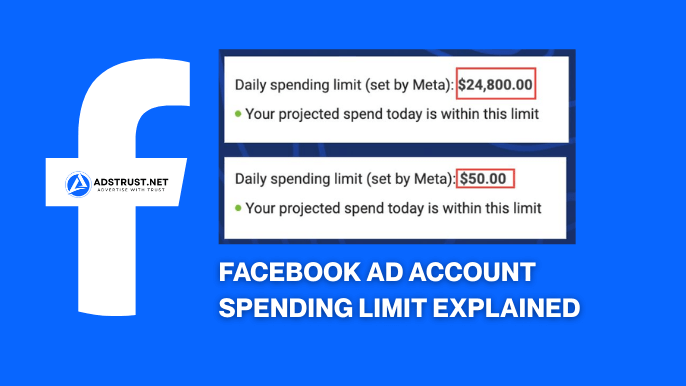
The Daily Spending Limit is Meta’s automated cap on how much a single ad account can spend within 24 hours.
New accounts commonly start in the lower range, often somewhere between a modest daily cap and a few hundred dollars, though the exact starting figure varies by account history, region, and payment method.
In AdsTrust’s experience preparing and delivering ad accounts, initial caps tend to correlate closely with account age, verification status, and the strength of the linked payment method.
DSL is not fixed forever: it typically adjusts as the account builds a track record of successful charges and policy-compliant campaigns.
How Long Does It Take for DSL to Lift?
There is no universal timeline Meta publishes for when a Daily Spending Limit increases.
In practice, based on AdsTrust’s work with hundreds of ad accounts, consistent compliant spending over several weeks tends to correlate with gradual increases, while erratic spend or policy flags tend to stall it.
Some accounts see movement within the first couple of weeks of steady activity, others take a full billing cycle or longer, especially if payment methods change mid-cycle.
Treat any specific day-count you see online as a rough pattern, not a guarantee, since Meta’s systems evaluate each account individually.
How to Set, Change, or Remove an Account Spending Limit (ASL)
An Account Spending Limit is a manual cap you set yourself, separate from Meta’s automated DSL.
It lives inside Ads Manager under Billing, in the Payment Settings section, where advertisers can view and adjust the account-level cap.
- Open Ads Manager and navigate to Billing.
- Go to Payment Settings and locate the Account Spending Limit field.
- Enter a new total limit, or clear the field to remove the cap entirely.
- Save the change and allow processing time before it takes effect.
- Confirm the update reflects correctly before launching new campaigns.
Changes to ASL typically take effect after a short processing window, commonly cited as around 15 minutes, though this can vary and should not be treated as an exact guarantee.
Removing the limit entirely simply means clearing the field, after which the account is bound only by the automated DSL and any campaign-level caps still in place.
What Happens When You Hit a Spending Limit?
When an ad account hits its spending limit, whether DSL or ASL, all active ads under that account pause immediately.
This is a hard stop, not a gradual throttle: delivery halts across every campaign in the account until the limit is raised or the next billing cycle resets it.
For agencies running live launches, this makes proactive limit management essential rather than reactive damage control.
Campaign Spending Limits vs Account-Level Limits

A Campaign Spending Limit caps total spend on one specific campaign, independent of the account’s overall DSL or ASL.
This means you can run several campaigns under one account, each with its own budget ceiling, without those individual caps changing the account-wide limit.
This is useful for agencies managing multiple client budgets inside a single Business Manager, where each campaign needs its own hard stop regardless of the parent account’s total capacity.
You can see how this plays out across multi-account setups in How Facebook Business Manager Controls Ad Accounts in 2026.
Prepaid vs Credit Card Billing: How It Affects Limits
Billing method has a direct influence on how spending limits behave and how quickly they can be raised.
Prepaid balance setups generally cap spend to whatever balance is loaded, which can make ASL changes feel restricted since there is no credit line to draw against.
Credit card or auto-charge billing tends to give Meta more payment history data to evaluate, which in AdsTrust’s experience often correlates with smoother limit increases over time, assuming charges succeed consistently.
Manually-set payment methods, versus fully verified auto-billing, are one reason two accounts with identical ad spend can see very different DSL trajectories.
Why Can’t I Increase My Facebook Ad Account Spending Limit?
The most common reasons an advertiser cannot raise their spending limit come down to payment verification, account age, or unresolved policy flags.
- Payment method not fully verified or repeatedly failing charges.
- Account too new, with insufficient spend and payment history for Meta’s systems to evaluate trust.
- Recent ad rejections or policy strikes still active on the account.
- Prepaid balance restrictions that cap spend regardless of manual ASL changes.
- Business verification incomplete at the Business Manager level.
If you’re seeing an account stuck at a low limit for weeks with no movement, Why Some Facebook Ad Accounts Stay Limited for Too Long walks through the more stubborn cases.
Does Verifying Your Business Help Lift Spending Limits Faster?
Business verification at the Business Manager level is one of the trust signals Meta’s systems weigh when evaluating an account for higher spending limits.
A verified Business Manager, paired with a clean payment and compliance history, tends to start from a stronger position than an unverified one, though verification alone does not guarantee an immediate limit increase.
AdsTrust’s own Facebook Business Manager Spending Limits Explained covers how BM-level verification interacts with the ad accounts sitting underneath it.
Spending Limits for Agencies and Multi-Client Structures
Agencies running multiple client ad accounts face a specific version of this problem: each account under a Business Manager can carry its own DSL, independent of the others.
This means one client’s account can be stuck on an entry-level cap while another, older account in the same BM runs at a much higher ceiling.
Best practice among media buyers is to plan for this rather than fight it, since Meta evaluates each ad account’s history individually even inside a shared Business Manager.
- Stagger new client onboarding so multiple brand-new accounts aren’t all hitting low DSL at once during a big launch.
- Keep payment methods verified and current across every client account, not just the main one.
- Separate testing accounts from scaling accounts so a rejected test ad doesn’t drag down a proven scaling account’s trust signals.
- Request limit reviews proactively, days before a major campaign launch, rather than during the live push.
For a deeper look at why testing and scaling accounts should be treated differently inside the same BM, see The Real Difference Between Testing Facebook Ad Accounts and Scaling Accounts.
Requesting Limit Increases Before a Major Launch
Proactive limit management means checking an account’s current DSL and payment health at least a few days before a scheduled campaign spike, not the morning of.
If the account has a track record of clean payments and low ad rejection rates, a manual ASL adjustment combined with a short warm-up period of steady spend gives Meta’s systems time to reassess the account before the real demand hits.
Launching a brand-new account cold, straight into a high-budget push, is one of the most common ways agencies trigger unexpected caps mid-campaign.
Does the Spending Limit Affect Ad Delivery or CPM?
A spending limit itself does not directly change CPM or the auction dynamics of ad delivery.
What it does affect is pacing: once the limit is hit, delivery stops entirely for that account until the cap resets or is raised, which can disrupt learning phase and campaign momentum.
An account that repeatedly hits its DSL and restarts delivery can see less stable performance simply because the learning phase keeps resetting, not because the limit changed the cost per result directly.
How Account Age and Payment Verification Shape Initial Caps
Brand-new ad accounts, brand-new Business Managers, and freshly linked payment methods are all evaluated together when Meta sets an initial cap.
An aged, previously active profile with an established payment history generally starts from a more favorable position than a same-day signup with no history at all.
This is one reason agencies scaling quickly often prefer to work with ad accounts, Business Managers, and profiles that already carry some operating history rather than starting completely from zero, an approach covered in How Agencies Build Facebook Business Manager Systems.
AdsTrust’s Facebook Ad Accounts catalog includes profile-based accounts across different starting cap tiers, prepared and tested before delivery, for teams who want to skip the earliest, most fragile stage of a brand-new account’s life.
System Glitches and Support Escalation
Occasionally a spending limit fails to update even after the standard processing window, or an account shows a cap that doesn’t match its actual payment history.
When this happens, the first step is confirming the payment method is fully verified and that no pending review or ad rejection is sitting unresolved in the account.
If the limit still won’t move after a reasonable wait, escalating through Meta’s official support channel is the appropriate next step, since third-party guides cannot override Meta’s internal review queue.
The Meta Business Help Center is the correct starting point for account-specific billing or limit disputes that a general guide like this one cannot resolve.
Tired of fighting low starting caps on brand-new accounts? AdsTrust delivers verified, tested Facebook ad accounts and Business Managers with clearer starting trust, so your team spends time scaling instead of babysitting a fresh $50 cap.
FAQ: Facebook Ad Account Spending Limits
What is the difference between account spending limit and daily spending limit on Facebook?
The Account Spending Limit (ASL) is a manual, lifetime total cap you set yourself in Payment Settings, while the Daily Spending Limit (DSL) is an automated, Meta-controlled cap on spend within a 24-hour window.
Both can exist on the same account simultaneously, and hitting either one pauses all ads immediately.
How long does it take for Facebook to increase my daily spending limit?
There is no fixed timeline Meta publishes.
In AdsTrust’s experience, accounts with consistent, compliant spend and a clean payment history often see movement within a few weeks, but some take longer, especially if payment methods change or ads get rejected along the way.
Can I set a custom account spending limit on a brand new ad account?
Yes, the Account Spending Limit field in Payment Settings is available on new accounts, but setting a high ASL manually does not override Meta’s separate, automated Daily Spending Limit, which is evaluated independently.
Why can’t I increase my Facebook ad account spending limit?
Common blockers include an unverified or repeatedly-failing payment method, a very new account with little history, recent ad policy violations, or a prepaid balance that caps spend regardless of the ASL setting. Business verification at the BM level can also be a factor.
Do spending limits affect ad delivery or CPM?
A spending limit does not directly change CPM, but hitting it pauses all delivery in the account immediately, which can disrupt the learning phase and indirectly hurt performance stability if it happens repeatedly.
How do I remove an account spending limit completely?
In Ads Manager, go to Billing, then Payment Settings, and clear the Account Spending Limit field entirely. This removes the manual ASL cap, leaving the account governed only by Meta’s automated DSL and any active campaign-level limits.
Can I have different spending limits for different campaigns under one account?
Yes, Campaign Spending Limits are set individually per campaign and operate independently of the account’s overall ASL or DSL, which lets agencies cap individual client budgets inside one shared ad account.
Does verifying my business information help lift spending limits faster?
Business verification at the Business Manager level is one signal Meta’s systems weigh alongside payment history and compliance record.
A verified BM combined with clean spending tends to start from a stronger trust position, though it is not a guaranteed shortcut on its own.
Written by Victor Kwang, Meta advertising specialist and blog lead at AdsTrust Global Pte. Ltd., Singapore. Victor’s team has worked in Facebook advertising since 2017 and has helped 2,000+ customers scale ad accounts and Business Managers safely. Read more from Victor on his author page.