
TL;DR: The best Facebook Business Manager for dropshipping depends on your stage: BM1 or BM3 for testing new products, BM5-BM10 for scaling winners across multiple ad accounts, and BM50+ for agencies running several stores. Verification and account history matter more than raw tier size for reducing ban risk.
What Is a Facebook Business Manager, and Why Do Dropshippers Need One?
A Facebook Business Manager (BM) is Meta’s admin layer that sits above ad accounts, Pages, pixels, and catalogs, letting you organize and control advertising assets in one place through Meta Business Suite.
It is not the same as a personal profile running ads directly – a BM separates business assets from your personal Facebook login.
For dropshippers, this separation matters for one practical reason: personal ad accounts are fragile.
They’re tied to a single profile, share risk with everything else you do on Facebook, and typically carry lower starting spend limits.
A dedicated BM lets you assign multiple ad accounts, add a Facebook Pixel and product catalog cleanly, and critically replace a restricted ad account without losing your Page, pixel data, or catalog history.
If you want the full mechanics, see this Business Manager complete guide.
Answer in short: yes, dropshippers need a Business Manager (not a bare personal ad account) because BM structure isolates risk, supports multiple ad accounts per store or product test, and is required for whitelisted/agency ad account setups once you scale past a single campaign.
BM1 vs BM3 vs BM5 vs BM10 vs Higher Tiers: Which Fits Your Dropshipping Stage?
BM tiers differ mainly in how many ad accounts they hold and the starting daily spend limit attached to each.
BM1 gives one ad account for solo testing;
BM3/BM350 give a small pool for running variants;
BM5 and BM10 add redundancy for scaling;
BM50 and above are built for agencies managing multiple client stores under one structure.
| Tier | Ad Accounts | Typical Spend Limit | Best Dropshipping Use |
| BM1 | 1 | $250 limit | Solo product testing, single store |
| BM350 / BM3 | 1-3 | $25-$50 limit | Early testing, budget-conscious validation |
| BM5 | 5 | $250 / No Limit | Testing multiple products at once |
| BM10 | 10 | $250 / No Limit | Scaling a winning product, account redundancy |
| BM50 | 50 | $250 / No Limit | Agencies, multi-store operators |
| BM2500 | 2500 | No Limit | Enterprise media buying teams |
There’s no universal ‘best’ tier, it’s matched to spend volume and number of concurrent tests.
Dropshippers testing one product at a time rarely need more than BM3-BM5; those running five stores simultaneously outgrow BM1 fast.
A detailed breakdown of tier logic is in this BM tier comparison guide, and if you’re deciding between the two most common scaling tiers, when to move from BM5 to BM10 walks through the exact triggers.
Verified vs Unverified vs Reinstated Business Managers: What Actually Changes?
A verified Business Manager has completed Meta’s business verification process, which in most cases raises the daily spend ceiling, unlocks broader targeting options, and signals more trust to Meta’s automated review systems.
An unverified BM works fine for early testing but usually hits lower spend caps sooner.
A reinstated BM is one that was previously disabled and restored after appeal, it can function normally, but its history means it’s watched more closely, so conservative spending pace matters more than usual.
Verification is not a magic shield against restriction; verified BMs can still get flagged if the ad account or Page attached to them shows policy-risk signals.
For a grounded look at this, read why verified Business Managers still get restricted.
Do you need a verified BM for dropshipping? Not on day one.
But once you’re spending consistently and want higher daily limits without manual increase requests, verification is the practical next step, see do you need a verified BM before you scale.
Aged Facebook Business Manager vs Fresh BM: Does Age Reduce Ban Risk?
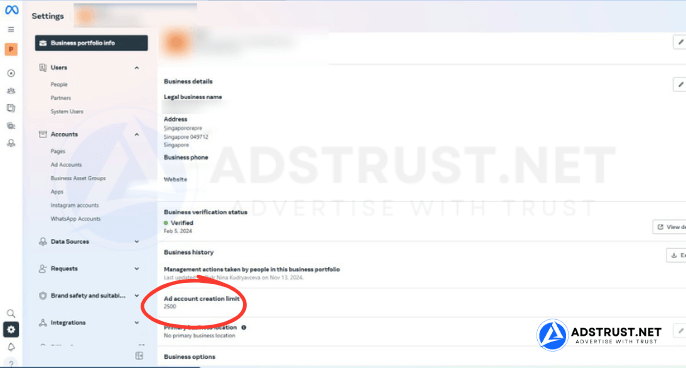
An aged Business Manager is one with billing and activity history rather than a brand-new registration date.
In most cases, accounts with established payment history and no policy strikes are treated with more tolerance during automated reviews than a BM created minutes ago and immediately pushed with high daily spend.
This doesn’t mean age alone guarantees safety, a fresh BM used with a slow, deliberate warm-up process can perform just as reliably as an aged one.
Age is a supporting trust signal, not a substitute for clean setup, honest landing pages, and gradual spend increases.
When aged BMs make the most sense
- You’re launching straight into scaling budget without a testing runway
- You’ve had prior restrictions and want a cleaner starting trust position
- You’re managing client budgets where downtime is costly
- You plan to attach a high-volume Pixel and catalog immediately
How Daily Ad Spend Limits Scale for Dropshipping Accounts
Daily spend limits are Meta’s per-account ceiling on how much can be spent before requiring review, and they typically increase as an ad account or BM builds consistent, on-time billing history.
New BMs and ad accounts start conservative by design, this protects both Meta and the advertiser from runaway ad spend on unvetted accounts.
For dropshippers, this means testing budgets should respect the starting limit rather than fighting it.
Trying to force a $50-limit account past its ceiling on day one is a common trigger for review. Instead, spend steadily near the limit for several days before requesting an increase.
The mechanics of this are covered in how ad account spending limits actually work and how to increase your spending limit.
Why Do Dropshipping Ad Accounts Get Banned?
Dropshipping ads face specific scrutiny because the business model itself, new stores, fast product turnover, aggressive creative, COD offers in some regions, overlaps with patterns Meta’s systems watch for.
Common triggers include misleading before/after claims, unverified domains, thin or templated landing pages, and rapid spend spikes on new accounts.
- Unverified domain not matching the Pixel or catalog
- Landing pages with missing policy pages, contact info, or refund terms
- Reused ad creative flagged across many advertisers
- Spend jumping far beyond the account’s current limit overnight
- Multiple stores or Pixels crammed into one under-warmed BM
Good account setup mitigates this: domain verification, a clean Fanpage with real activity, gradual spend pacing, and separating test accounts from scaling accounts.
See the real difference between testing and scaling accounts for a concrete framework.
What Happens When a BM Gets Disabled? Replacement and Compliance, Explained Plainly
When a Business Manager gets disabled, the standard path is an appeal through Meta’s review process, which can take variable time and isn’t guaranteed to succeed, there’s no fixed timeline Meta publishes, and outcomes depend on account history and the reason flagged.
This is why buyers should understand a seller’s replacement terms before purchase, not after a ban.
At AdsTrust, Business Manager products are covered at the point of delivery and inspection, meaning the BM is verified active and accessible when handed over.
Verified/Unlimited BM products carry a 7-day verification-status warranty and a 3-day spend-limit warranty.
Once you log in successfully, the account becomes your responsibility, since ongoing standing depends heavily on how it’s used from there.
For the appeal process itself, this step-by-step BM appeal guide is a useful reference, and why BMs get disabled in the first place helps you avoid repeat triggers.
How to Choose a Business Manager Provider: Trust Signals Checklist
A trustworthy BM provider is one that states its warranty terms in writing before you pay, verifies and tests accounts prior to delivery, and gives you a real support channel rather than a form.
Avoid any seller that promises accounts are ‘unbannable’ no legitimate provider can guarantee that, since long-term standing depends on usage.
- Written warranty terms per product type, not vague promises
- Verified-before-delivery process, not ‘as-is’ listings
- Transparent pricing per tier with no hidden upgrade fees
- Responsive support channel (Telegram, WhatsApp, email)
- Honest language about compliance and ban risk, not ‘ban-proof’ claims
AdsTrust Global Pte. Ltd. is a Singapore-based team of specialists with Meta advertising experience since 2017, having served 2,000+ customers across 500+ projects.
Accounts are verified and tested before delivery, payment is crypto-only (USDT, BTC, ETH) via a confirmed order flow, and support runs 24/7 online with office hours Mon-Sat, 8AM-5PM SGT.
How Much Does a Business Manager Cost? Pricing by Tier
BM pricing scales with ad-account count and spend capacity.
Entry tiers cost under $20; mid-tier scaling BMs run $199-$399; agency and enterprise tiers run into the thousands given the volume of accounts and spend they support.
| Product | Ad Accounts |
| BM New Facebook Business Manager | 1, $25-$50 limit |
| BM3 Facebook Business Manager | 3, $50 limit |
| BM350 Facebook Business Manager | 1, $25-$50 limit |
| BM1 Facebook Business Manager | 1, $250 limit |
| BM Verified (Long-Term, High-Trust) | Varies |
| BM5 Facebook Business Manager | 5, $250/No Limit |
| BM10 Facebook Business Manager | 10, $250/No Limit |
| BM50 Facebook Business Manager | 50, $250/No Limit |
| BM2500 Facebook Business Manager | 2,500, No Limit |
Best Business Manager for Dropshipping by Stage

Matching BM tier to funnel stage avoids both under-provisioning (constant limit fights) and over-provisioning (paying for capacity you don’t use).
| Dropshipping Stage | Recommended Tier | Why |
| Testing a new product/store | BM1 or BM3 | Low cost, enough accounts to run 2-3 creative variants |
| Scaling a validated winner | BM5 or BM10 | Redundancy across accounts if one gets limited mid-scale |
| Running multiple stores solo | BM10 | Enough headroom without agency-level overhead |
| Agency / multi-client management | BM50 or BM2500 | Structured separation per client, whitelisting support |
For most solo dropshippers moving from testing into scaling, BM10 is the practical middle ground, enough ad accounts to rotate through limits without agency-level cost.
If you’re unsure whether BM10 or BM50 fits your current volume, this BM10 vs BM50 comparison breaks down the decision point clearly.
Tired of BM limit fights slowing down your testing cycle? Skip the guesswork with a clean, verified-before-delivery Business Manager sized to your stage, no spam, no unbannable promises, just honest inventory and real support.
What is the best Facebook Business Manager for dropshipping?
There’s no single best tier. It depends on stage. BM1 or BM3 suit product testing on a tight budget;
BM5-BM10 suit scaling a validated winner across several ad accounts; BM50+ suits agencies running multiple client stores at once.
How many ad accounts can I have in one Business Manager?
It depends on the tier: BM1 holds one ad account, BM5 holds five, BM10 holds ten, and enterprise tiers like BM50 or BM2500 hold dozens to thousands.
Meta also applies its own account-count rules that can affect available slots regardless of tier.
What is the difference between a Business Manager and a personal ad account?
A personal ad account runs directly under your individual Facebook profile with no organizational layer, while a Business Manager sits above ad accounts, Pages, and pixels, letting you manage multiple assets, add team members, and isolate risk.
For dropshipping, this separation is what lets you replace a limited account without losing your Page or pixel history.
Is it safe to buy a Facebook Business Manager for dropshipping?
It can be, provided you buy from a provider with clear, written warranty terms, a verified-before-delivery process, and honest language about compliance risk.
Avoid sellers promising ‘unbannable’ accounts, no provider controls Meta’s review outcomes, only the starting quality of the asset.
What is a verified Business Manager and do I need one?
A verified Business Manager has completed Meta’s business verification, which typically raises spend limits and adds trust signals during review.
You don’t need one for early product testing, but it becomes practical once you’re spending consistently and want higher limits without manual requests.
How much does a Facebook Business Manager cost?
Prices scale with ad-account capacity: entry tiers like BM New or BM3 run around $5-$15, mid tiers like BM1 and BM5 run $49-$199, BM10 sits around $399, and agency/enterprise tiers like BM50 or BM2500 run into the thousands.
Why do dropshipping Facebook ad accounts get banned?
Common triggers include unverified domains, thin landing pages missing policy information, reused flagged creative, and spend spikes far beyond an account’s current limit.
Careful setup (domain verification, gradual spend pacing, and separating test accounts from scaling accounts) meaningfully reduces this risk.
Do I need an aged Business Manager for dropshipping?
Not strictly. An aged BM with billing history can be treated with more tolerance during automated review, but a fresh BM that’s warmed up properly and spent conservatively performs comparably.
Age is a supporting trust signal, not a requirement.
Written by Victor Kwang, blog lead at AdsTrust Global Pte. Ltd. (Singapore), covering Facebook Business Manager infrastructure, verification, and account trust for media buyers and dropshippers worldwide.